How to Create Epic Lyric Videos That Stand Out
Jump To Key Section
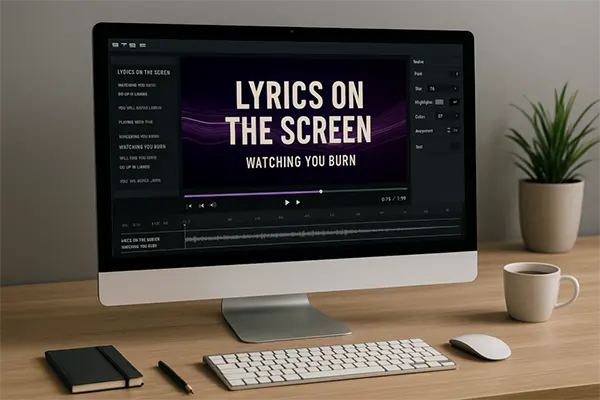
Many artists consider the lyric videos as a primary visual expression of the content. This means that lyrics are no longer a supplementary characteristic; they have evolved into an indispensable element.
They serve as an introduction to the song, lead the audience through the listening experience, and influence the lasting impression of the track. A successful lyric video excels in three key areas. It ensures the lyrics are easily legible, maintains perfect synchronization with the music, and establishes a visual ambiance that complements the audio.
This guide aims to provide insights into crafting effective lyric videos by utilizing contemporary tools, templates, and a straightforward approach. Scroll up to understand the purpose of using lyrics and the primary steps to create a lyrical video!
KEY TAKEAWAYS
- With the help of lyrics, the audience understands the context better, hence the engagement increases.
- Don’t focus on decorating the whole team; instead, start with a basic structure.
- Some templates are provided directly in the tool, and using them might reduce human-made errors.
- Check out the step-by-step method of creating a lyrical video.
Why Lyric Videos Perform So Well
Listeners are seeking context. Lyrics show it immediately.
On platforms like YouTube and Instagram, text-driven videos capture attention longer than static images. Lyrics also encourage repeat viewing because people continue to follow lines they missed the first time.
Videos with clear on-screen text improve viewer retention and comprehension, especially for music discovery, according to Google’s research on video engagement.
Lyric videos meet listeners exactly where they are. On phones. On social feeds. Set to autoplay.
Start With Structure, Not Effects
The most prominent mistake artists make is starting with visuals instead of structure.
Before designing anything, break the song down. Identify verses, bridges, choruses, and drops. Note where passion rises and where it pulls back.
This structure should determine everything: text timing, motion intensity, and visual transitions.
If the structure is clear, the video will eventually feel intentional instead of chaotic.
Why Templates Matter
Templates save time, but more fundamentally, they enforce consistency.
Good lyric video templates typically solve common problems. Timing logic is built in when the text hierarchy is clear. Motion is linked to rhythm instead of random animation.
Modern tools like a lyric video creator offer a massive range of templates designed specifically for music. These templates are genre-aware. Some are minimal and clean, while others are bold and energetic. Many are designed to react directly to audio, so the system handles execution.
How Templates Improve Quality
Templates limit human error. Transitions stay smooth. Lyrics stay readable. Visual pacing stays consistent across the entire song.
They also make it quicker to scale. Once you find a style that fits your sound, you can modify it across releases with small variations. This builds visual identity without necessarily starting from scratch every time.
Consistency builds recognition, which eventually builds trust.
Step-by-Step: How to Create a Lyric Video
The path comes down here. You have to move ahead slowly by following the given steps:
Step 1: Prepare the audio
- Export a refined version of the track.
- Use a high-quality WAV or MP3.
- Trim long silence at the beginning, so visuals start quickly.
Step 2: Finalize your lyrics
- Make certain that the lyrics are correct.
- Check line breaks, spelling, and phrasing.
- Decide which lines should appear linked together and which should stand alone.
Step 3: Choose a template
- Consider selecting a template that matches the song’s mood and tempo.
- Faster tracks can profit from sharper motion.
- Slower tracks need breathing room.
Step 4: Upload audio and lyrics
- Most lyric video tools enable you to upload both at once.
- The system automatically aligns text with vocals, which saves time and improves accuracy.
Step 5: Adjust timing
- Fine-tune the situation when lyrics appear and disappear.
- Pay close attention to lyrics and emotional lines.
- Timing should feel seamless, not rushed.
Step 6: Customize visuals
- Adjust fonts, colors, and background elements.
- Keep contrast high.
- Do not use thin fonts.
- Note that many viewers watch on small screens.
Step 7: Add subtle motion
- Employ this motion to support the beat, not overpower it.
- Small fades and directional shifts work better than constant animation.
Step 8: Review the full video
- Watch the entire track instead of skipping.
- Look for hard-to-read text, sync issues, or distracting effects.
Step 9: Export for the platform
- Select the correct aspect ratio.
- Vertical for Reels and TikTok.
- Horizontal for YouTube.
- Square if needed.
Step 10: Test and refine
- Track engagement.
- If viewers drop early, tighten the opening.
- In case they rewatch, note which sections work best.
Typography Is Non-Negotiable
Lyrics must be understood instantly.
Use bold, clean fonts and avoid decorative styles that sacrifice clarity. While you leave enough space between lines, keep text centered or consistently aligned.
Good typography disappears. Inappropriate typography ruins the video.
Use Lighting and Visual Mood Carefully
Visual ambiance matters, but it should stay controlled.
Gradients, glow effects, and light accents can enhance mood when used sparingly. Many creators take influence from stage lighting or signage, similar to the visual impact seen in custom neon signs, where light highlights character without clutter.
The primary virtue is restraint. Let the lyrics stay in focus.
Optimize for Multiple Platforms
A lyric video should not remain in only one place.
Cut short clips for social media, loop choruses to create teaser versions. Because formats can be adjusted without redesigning everything, templates make this easier.
Plan for reuse. It saves working hours and increases reach.
Common Mistakes to Avoid
Avoid overcrowding the screen with mismatched fonts and off-beat timing. In another case, you do not need to animate every word. Thus, do not sacrifice readability for style or ignore mobile viewers.
Simple videos presented well outperform complex videos done poorly.
Final Thoughts
Epic lyric videos are focused on clarity and control. Consider strong structure, clean typography, and purposeful motion, with templates that support the music instead of fighting it.
With the right tools and a repeatable process, lyric videos could be fast to produce and easy to scale. More than that, they become effective.
When lyrics are straightforward, and visuals stay in sync, the song receives the attention it deserves.
Ans: To match the visuals to the song’s mood, listen to the song a few times in a loop to grasp its emotional tone and theme.
Ans: Not really. With the help of Epic tools, even a beginner can create a high-quality lyric video.
Ans: Prioritize readability by increasing clear fonts and colors that contrast with the background and the text.
Ans: Yes, you may use stock footage or images to enhance the visual appeal of the background.