Troubleshooting Tips for New iPhone Malfunctions
“The iPhone is not and never was a phone. It is a pocket-sized computer that obviates the phone. The iPhone is to cellphones what the Mac was to typewriters.”
-John Gruber
(Technology blogger, UI designer, and Creator of the Markdown Markup Language)
Have you ever felt frustrated over your frozen iPhone screen or sudden battery drainage? Well, I did.
When I first bought my new iPhone and was new to the features and applications. I would wonder why my screen froze suddenly, or why the battery drained in a few hours.
If you are facing similar issues or more with your iPhone, here are some troubleshooting tips for iPhone and iPhone16 repair that will make it easier for you to use your iPhone your way.
Key Takeaways
- Common startup issues with iPhones.
- Problems with touch screen response.
- Battery drainage problems
- Wi-Fi and cellular connectivity issues
- Audio Malfunctions
- Camera not working properly
- Apps are crashing or freezing
Common Startup Issues
One of the common yet frequently witnessed problems is said to be its startup issues. We primarily have six reasons that could cause such trouble, which require an expected course of action, which could be listed as :
- Battery Discharged- Consider plugging in your phone.
- Firmware crash- Perform a forced restart.
- Damaged charging port- You can try using a wireless charging pad or follow the daughter board guide to change the charging port.
- Damaged screen- This requires changing the screen for a new one. You can use the iPhone screen replacement link for help.
- Damaged motherboard-In the worst cases, it could be due to a damaged motherboard, which requires immediate attention and replacement.
Problems With Touchscreen Response
In many cases, the iPhone display turns black, or the screen does not show any response. Though restarting your phone or charging it for an hour could be a go-to solution, if the problem persists, you could simply contact an iPhone repair service expert without delay.
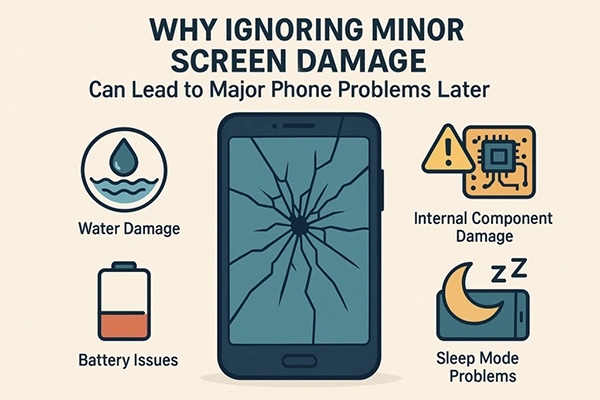
The infographics further explain why ignoring minor screen damage could result in major problems later:
Battery Draining Quickly
An iPhone has a lithium-ion battery, which is likely to decline after 500 charging cycles. After a few years, the battery life declines. You can get a track of your iPhone’s battery health by visiting
Settings → Battery → Battery Health.
If the problem continues, you can use adaptive power iOS 26 or extend the battery life by using low power mode.
Wi-Fi and Cellular Connectivity Problems
Reasons that hinder a Wi-Fi connection include a poor router, an incorrect password, or, at times, even a bulky phone case.
To solve these issues, you should apply troubleshooting tips such as checking that your distance from the router is not too much, enabling Wi-Fi settings, and re-ensuring the Wi-Fi password.
Other probable actions involve disabling the parental controls by following these steps:
- Open “Settings” and go to “Screen Time.”
- Tap “Content & Privacy Restrictions”
- Here you will be asked to enter your Screen Time passcode
- Toggle the switch to the “off” position, turning it from green to gray
These actions will help you to clear any hindrance in connectivity and ensure a better connection.
Fun fact An iPhone survived a fall of over 13,000 feetA skydiver, Jarrod McKinney, lost his iPhone midair after jumping from 13,500 feet. When he found his phone with a GPS tracking app, the screen was cracked, but the phone was working.
Audio Malfunctions
Audio malfunctions could be yet another problem faced by users, which can occur due to voice scratching or inaudible voices. If you are facing a similar issue, you can follow these steps:
- The first course of action is to check if your Do Not Disturb mode is off.
- Then, Settings → Focus → Do Not Disturb.
Other actions could involve cleaning the receiver or speaker, removing all the screen protectors, or dragging Ringtone and Alerts back and forth a few times to check if it is just the settings. Or if the problem lies with the speaker, which would require a replacement of the same.
Camera Not Working Properly
If your camera doesn’t work well or the photos appear blurry or have poor visual quality, software glitches can be one of the reasons, which could be resolved by following these steps:
- Remove any case, film, or accessory that might block the camera or flash.
- Test the camera by taking a photo.
- Check your LED flash and tap the torch icon
- Sometimes, simple actions such as cleaning the camera lens or restarting your iPhone could also bear results.
Apps Crashing or Freezing
The crashing or freezing of apps could be due to software bugs, an incompatible iOS version, or low storage space.
To resolve these crashes, you can force-quit the app and try reopening it, update the app, check for iOS updates, free up storage space, clear app cache and data, and ultimately check for compatibility issues with the app.
Overheating Concerns
iPhones often get overheated due to software concerns, environmental changes, battery problems, heavy usage, or malware.
The problem of overheating can be solved with a few tricks, such as switching off your phone, removing its case, keeping it away from heat sources, using Airplane mode, etc.
Conclusion
So, if your iPhone has any issues and you don’t know what to do or it’s expensive to visit an Apple store, these trips could be a lifesaver for you.
FAQs
Ans: Common causes for iPhone screen damage include pressure on the display panel, physical shock or impact, electrical problems, and even age-related wear and tear.
Ans: Outdated or corrupted drivers often cause display-related problems in iPhones, like incorrect colors, distortion, HDR not working, blurry or pixelated screen.
Ans: It is made of metal, glass, and plastic and has sensitive electronic components inside. iPhone or its battery can be damaged if dropped, burned, punctured, or crushed, or if it comes in contact with liquid.
Ans: Glitch effects happen when you break and reassemble sound in creative ways.