Spotify Playlist to MP3 Converter: Why ViWizard Is the Top Choice?
Jump To Key Section
The way we use music, podcasts, and playlists has been transformed with music streaming services. Of all the music streaming services, Spotify is one of the largest music streaming services available to individuals all over the world, with millions of songs and expertly crafted playlists designed to suit your current mood.
Unfortunately, there is one problem that nearly all Spotify users have experienced at some point: you are only able to listen to the music you have downloaded to your device through Spotify’s app. Once you stop paying for Spotify or if you don’t have internet access, you will no longer have access to those songs.
So, is there a way to download Spotify playlists to MP3 and keep them forever? The answer is yes, and in this guide, we’ll show you how to do it easily so that new users can save their songs without any obstacles.
Let’s get started
Key Takeaways
- Understanding why you should download Spotify playlists to MP3
- Looking at some real-world applications
- Uncovering the common methods that are generally used by many people
- Exploring the best choice by considering ViWizard
- Decoding some simple steps and how this platform stands out
Why Download Spotify Playlists to MP3?
Spotify Premium allows offline listening, but the downloaded tracks remain encrypted. That means you cannot:
- It easily navigates Spotify downloads to MP3 players
- Does a complete breakdown of Spotify songs to a CD
- Use tracks in video editing software
- Keep music after canceling your subscription
After doing the seamless conversion of your songs, you can take full control of your music gallery. MP3 files are universally compatible, lightweight, and easy to store on any device — from smartphones and tablets to USB drives and car audio systems.
For travelers, students, fitness lovers, and music collectors, having offline MP3 copies of Spotify playlists ensures uninterrupted entertainment anywhere, anytime.
Interesting Facts
Top-tier converters offer up to 320kbps MP3 output, matching Spotify’s “Very High” streaming quality. Free or lower-quality converters often default to 128kbps.
Real-World Applications for Your MP3 Playlists
Once you’ve converted your Spotify playlists with ViWizard, the possibilities expand dramatically:
- Travel: Eliminate international roaming fees by downloading music from your computer to mobile devices or MP3 players.
- Gifts: Personalize MP3 playlists as gifts.
- Professional purposes: Use copyrighted music (while taking your copyright protection into account) for all commercial products.
- Archiving: Save special collaborative playlists or seasonal playlists for future enjoyment.
- Multi-Device Access: Sync your music across devices that don’t support Spotify apps
Common Methods to Download Spotify Playlists
There are several ways people attempt to save Spotify music:
- Screen recording or audio recording – Time-consuming and causes quality loss.
- Online Spotify downloader sites – Often unreliable, low quality, and filled with ads.
- Professional Spotify converter software – Fast, stable, high-quality results.
Among these, dedicated desktop software remains the most reliable and efficient solution.
Best Solution: ViWizard Spotify Music Converter
If you’re looking for a powerful yet simple way to download Spotify playlists to MP3, ViWizard Spotify Music Converter is designed specifically for this purpose.
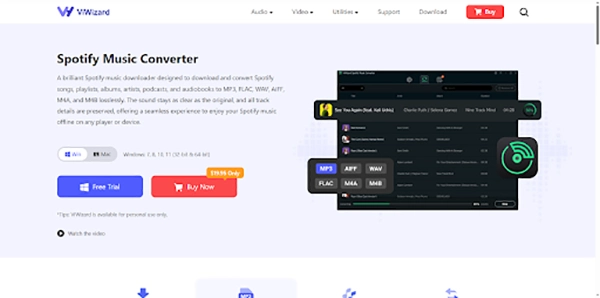
ViWizard is an industry-leading tool that helps in the conversion of Spotify songs, albums, artists, and entire playlists into common audio formats such as MP3, FLAC, WAV, M4A, and more — while keeping the original sound quality and ID3 tags intact.
- Batch playlist conversion – Download entire Spotify playlists in one click
- Lossless audio quality – Preserve original bitrate and sound clarity
- Multiple output formats – MP3, FLAC, WAV, AIFF, M4A
- Fast conversion speed – Up to 15X faster processing
- Keep ID3 tags – Artist, album, title, and artwork retained
- Built-in Spotify web player – No need to install Spotify app
- Adaptible on Windows & Mac
These features make ViWizard a favorite tool among Spotify users who want a permanent and flexible music library.
How to Download Your Spotify Playlist to MP3 in 4 Simple Steps
Step 1: Download and Install ViWizard
Initiate the procedure by downloading ViWizard Spotify Music Converter from the official website. The installation process is straightforward and takes just minutes on both Windows and Mac platforms.
Step 2: Import Your Spotify Playlist
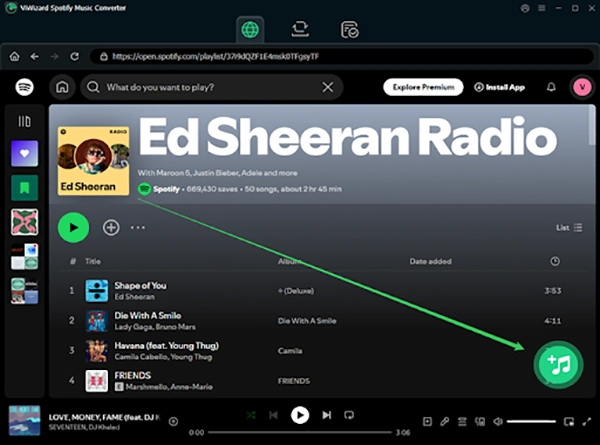
Launch ViWizard, and the built-in Spotify web player will appear. Sign in with your Spotify Free or Premium account. Then browse your library and open the playlist you want to download. Click the “+” button to load the entire playlist into ViWizard’s conversion panel.
Step 3: Customize Your Output Settings
Here’s where ViWizard shines with flexibility:
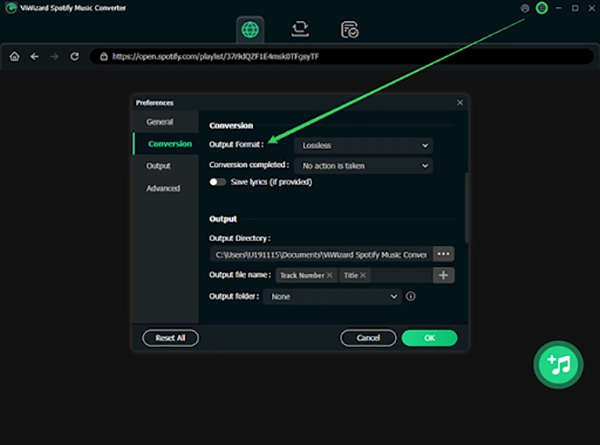
- Choose MP3 as your output format (other options include AIFF, FLAC, WAV, and M4A)
- Select your preferred bitrate (up to 320 kbps for premium quality)
- Organize files with customizable ID3 tags (artist, album, track number)
- Set output folder location for easy access
Step 4: Convert and Enjoy
Click “Convert” and watch as ViWizard processes each track. The converter works efficiently, maintaining the original audio quality while removing DRM restrictions. Once complete, your MP3 files are ready to transfer to any device for permanent offline enjoyment.
Why ViWizard Stands Out from Other Tools
There are many Spotify converters on the market, but ViWizard offers an excellent balance of simplicity, speed, and stability. Unlike online downloaders that often fail or reduce quality, ViWizard delivers consistent, high-quality results. Due to its clean and accessible interface, it becomes easily familiar with audiences and even for users with no technical background. In addition, frequent updates ensure compatibility with Spotify’s latest changes, giving you long-term reliability.
Final Thoughts
Spotify is a fantastic streaming platform, but its offline limitations can be frustrating. Converting Spotify playlists to MP3 offers the freedom to listen without boundaries, subscriptions, or internet connections.
By using ViWizard the process of saving your best songs becomes rapid and hassle-free. Whether you want to keep your favorite playlists forever, play music on any device, or build a personal offline library, ViWizard provides an efficient all-in-one solution.
If you’re ready to take control of your Spotify music, downloading Spotify playlists to MP3 with ViWizard is the smartest move for unlimited offline enjoyment.
Ans: 1000 songs on Spotify can take anywhere from 2.25 GB to 9.6 GB or more.
Ans: Spotify now requires each track to achieve at least 1,000 streams within 12 months to qualify for Spotify royalty payments.
Ans: Yes, the Spotify Web API is free to use.