How Often Should You Audit Your DAM Permissions?

In most of the cases, teams set up DAM permissions and never look at them again. This happens not because of the team’s negligence.
But because once the system is set up and all roles are defined with access to everyone, the need to visit it over time fades away.
And this is where the trouble begins.
As time passes and teams move with the flow, even the slightest change in the guidelines can cause major repercussions that go unnoticed but later create security gaps.
Follow along to learn why quarterly reviews will keep your DAM secure and your team accountable.
Table of Contents
Why Annual Reviews Aren’t Enough
Permission reviews are handled by many organisations as an annual checklist that is usually part of a more comprehensive IT audit at the end of the year.
The issue is that a year is a long period of time.
Project team changes, contractor departures, new hires, employee turnover, and reorganisation all have an impact on who needs access to what.
Outdated permissions accumulate silently in the background when you only review once a year.
Think about how fast role creep occurs in real life. In order to upload assets for a product launch, a content manager is granted temporary admin access.
The launch ends, but nobody revokes the extra permissions. Three months later, that same person accidentally overwrites a set of approved brand templates.
It’s not malicious. It’s just what happens when permissions drift unchecked.
Quarterly reviews catch these problems before they snowball. They’re short enough to be manageable but frequent enough to reflect actual changes in your team.
What DAM Permissions Actually Control
Before you can audit permissions properly, it helps to know exactly what they cover. In most systems, DAM permissions determine who can view, download, edit, upload, and delete assets.
They also regulate who is able to share files externally, manage metadata, and approve content.
Permissions can be assigned at the:
- Folder
- Collection
- or even at the individual asset level on good DAM platforms.
You can limit downloads based on file type or licensing status, establish user groups associated with particular departments or projects, and set up approval workflows for sensitive content.
This granularity is helpful, but it also raises the number of possible issues.
With a quarterly audit, you can consistently confirm that all permissions still match each person’s actual responsibilities.
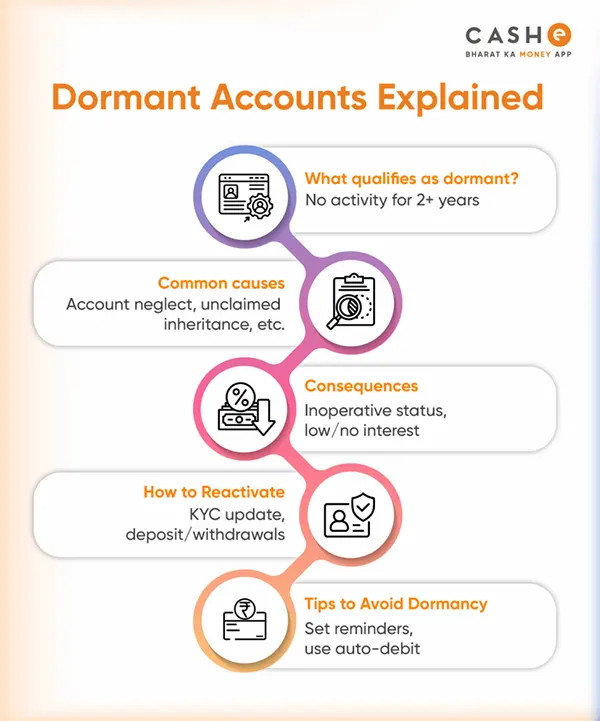
Dormant Accounts Are a Bigger Risk Than You Think
One of the most overlooked problems in any DAM system is dormant accounts.
These belong to people who have either finished a contract, quit the company, or simply stopped using the platform months ago.
Dormant accounts are a genuine security risk. If an old account gets compromised and nobody notices because nobody’s checking, the potential damage is significant.
Pull a list of all active users and verify the dates of their most recent logins during each quarterly review.
Anyone who hasn’t logged in for at least ninety days should have a flag raised. Make sure they still need access, or deactivate the account.
This five-minute task can avert a major issue later on.
You can further understand how a dormant account works with the infographic as depicted :
How Role Creep Quietly Expands Access
One of those problems that no one intentionally causes but that practically every organisation eventually has to deal with is role creep.
It occurs when someone takes on a temporary project, changes roles, or fills in for a coworker while obtaining additional permissions.
The new access gets added, but the old access never gets removed.
Individual users eventually have far more permissions than are necessary for their current role. The least privilege principle, which holds that people should only have access to what they actually need to perform their jobs, is broken by this.
The fix is straightforward. During each quarterly audit, compare every user’s current permissions against their actual job role.
Keep a simple log of changes so you’ve got a clear trail if anyone asks why their access was adjusted.
Don’t Forget Third-Party Access
For particular projects, DAM is frequently made available to photographers, agencies, freelancers, and outside partners.
Even though that access should have an expiration date from the moment it is granted, many teams actually forget to set one.
Third-party accounts are particularly worth watching because they sit outside your normal HR and IT processes.
There is typically a formal offboarding process in place when an employee departs. A freelancer’s DAM access may not even be on anyone’s to-do list once their project is finished.
Include checks for third-party access in each quarterly review.
List all of the external accounts, determine which projects they are associated with, and confirm if those projects are still underway. Revoke access right away if they’re not.
Use Audit Trails to Spot Problems Early
The majority of contemporary DAM systems have audit trail features that record each action made on the platform.
Permission changes, downloads, uploads, edits, deletions, and login attempts are all tracked. If these logs are examined, they can be very helpful.
During your quarterly review, set aside time to scan the audit trail for anything unusual. Look for:
- Users downloading large volumes of assets in a short period
- Permission changes made outside of normal admin processes
- Login attempts from accounts that should be inactive
- Bulk deletions or edits to metadata
You don’t have to read every word. Pay attention to patterns and anomalies that deviate from expected behaviour. Before continuing, look into anything that seems strange.
Pulling It All Together
You can’t set up DAM permissions once and then forget about them.
Roles change, people move on, and access that made sense six months ago may now be problematic. The easiest way to keep track of it is through quarterly reviews.
They provide you with a clear record of who has access to what and why, are quick, and identify issues early.
If you’re currently running annual reviews or, worse, no reviews at all, now is the time to shorten that cycle.
Your team will be confident that the appropriate individuals have access, your DAM will be more secure, and your compliance position will be strengthened.
FAQs