How to Connect to FTP on Mac with Commander One
Introduction
File Transfer Protocol (FTP) clients remain an essential tool for Mac users who need to manage files on remote servers, maintain websites, or securely share large amounts of data. Whether you are a web developer uploading site files, a business owner managing backups, or a freelancer handling client data, having a reliable FTP for Mac solution is still highly relevant. While macOS includes basic file transfer capabilities, dedicated FTP software provides far more control, flexibility, and security.
Commander One stands out as a powerful and reliable FTP client designed specifically for macOS. It combines an intuitive interface with advanced functionality, allowing users to manage local files, remote servers, and even cloud storage in one place. Users who want to Download FTP client for Mac can easily find Commander One through ftp-mac.com/, where its features and setup are clearly explained. With support for FTP, FTPS, and SFTP protocols, Commander One ensures a consistent and secure experience for all types of file transfers, making it a preferred solution for both beginners and advanced users.
Connecting to an FTP Server with Commander One
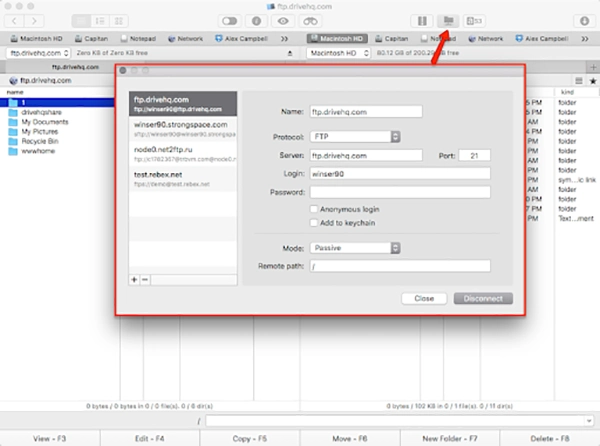
Connecting to an FTP server on a Mac using Commander One is a straightforward process that only takes a few steps. After downloading and installing the application, users are greeted with a clean dual-pane interface that simplifies navigation and file management.
To begin, open Commander One and locate the connection manager. From there, you can create a new FTP connection by entering the server address, username, password, and port number. Once these details are provided, the connection can be saved for future access, allowing you to reconnect instantly without re-entering credentials.
Commander One supports multiple connection protocols, including FTP, FTPS, and SFTP. It is commonly used for standard file transfers, while FTPS and SFTP add encryption layers that protect your data during transmission. This is especially important when handling sensitive files or working with secure servers.
Another advantage of Commander One is its ability to manage multiple connections simultaneously. You can connect to several servers at once, making it easy to transfer files between them or compare directory structures. Additionally, Commander One allows integration with cloud storage platforms, enabling users to move files between FTP servers and cloud accounts without switching applications.
Key Features of Commander One
Dual-Pane Interface
- Two side-by-side panels make file navigation simple and efficient
- Easy drag-and-drop file transfers between local and remote directories
- Improves workflow by reducing the need to open multiple windows
Advanced File Management Tools
- Copy, move, rename, compress, and delete files directly within the app
- Queue management allows multiple uploads and downloads simultaneously
- Folder synchronization ensures consistency between local and remote directories
Secure File Transfers
- Full support for FTP, FTPS, and SFTP protocols
- Encryption ensures safe transmission of sensitive data
- Ideal for developers and businesses handling private or confidential files
Cloud Integration
- Connects seamlessly with Google Drive, Dropbox, and OneDrive
- Manage cloud and FTP files within a single interface
- Eliminates the need for multiple file transfer tools
Commander One offers a comprehensive file management experience that goes beyond traditional FTP clients, making it a powerful all-in-one solution for Mac users.
Commander One’s Advantages Over Other FTP Clients
Modern and Intuitive User Interface
- Clean design tailored for macOS users
- Easy navigation for beginners and professionals alike
- Minimal learning curve compared to other FTP tools
All-in-One File Management Solution
- Combines FTP, cloud storage, and local file management
- Eliminates the need for separate applications
- Improves productivity with centralized file handling
High Performance and Reliability
- Handles large file transfers efficiently
- Supports multiple simultaneous connections
- Stable performance even with heavy workloads
Enhanced Security and Protocol Support
- Supports FTP, FTPS, and SFTP in one application
- Strong encryption for secure file transfers
- Better data protection compared to many traditional FTP clients
Suitable for All Skill Levels
- Simple enough for casual users
- Powerful enough for developers and IT professionals
- Flexible features that scale with user needs
Commander One provides a balanced combination of usability, performance, and security, making it a superior choice compared to many other FTP clients available for macOS.
Security and Usability
Security is a top priority for anyone working with remote servers, and Commander One addresses this with strong encryption support. By using SFTP or FTPS protocols, users can ensure that all data transfers are protected from interception. This is particularly important when handling login credentials or sensitive files.
In terms of usability, Commander One simplifies the entire FTP connection process. Features such as drag-and-drop transfers, batch processing, and automatic reconnection make file management effortless. If a transfer is interrupted due to network issues, the application can resume it without starting from scratch, saving both time and bandwidth.
Additionally, Commander One stores user credentials securely on the local machine, ensuring that sensitive information is not exposed to external servers. This local storage approach enhances privacy and reduces security risks.
The combination of strong encryption, secure credential storage, and user-friendly features makes Commander One a dependable tool for both personal and professional use.
Conclusion
For Mac users who need a reliable and efficient way to connect to FTP servers, Commander One offers an outstanding solution. It combines a user-friendly interface with powerful features, including support for FTP, FTPS, and SFTP, cloud integration, and advanced file management tools.
By simplifying complex file operations and ensuring secure data transfers, Commander One stands out as one of the best FTP clients available for macOS today. Whether you are managing websites, transferring large files, or working with remote servers, it provides everything you need in one place.
You can get started today by visiting ftp-mac.com and exploring its features. If you’re looking for a secure and user-friendly FTP client for your Mac, Commander One is the perfect choice.