How to Improve Workflow Efficiency: Tools, Tips, and Best Practices
Meeting madness is real these days; Firstly, you are expected to prepare for it, then be a part of it, and then be followed by discussing what you have already covered.
And after all that, you are expected to even reflect on the progress for which you have no time left. The main reason why people feel burned out and begin to loose productivity.

Having noted that, the main question is how to bring the productivity?
This guide is your cheat sheet to workflow efficiency: it gives practical methods, workflow optimization techniques, and the right tools you can use.
But let’s first untangle what workflow efficiency means.
KEY TAKEAWAYS
- Workflow efficiency improves when teams reduce manual work, streamline processes, and focus on high-value tasks.
- Automation can save significant time by handling repetitive tasks and reducing human error.
- Better document management helps teams find files quickly and ensures everyone works on the correct version.
- Reducing tool overload can minimize distractions and help teams maintain focus.
What Is Workflow Efficiency and Why Does It Matter?
The term can sound a bit abstract. Is it how many tasks you’ve marked as “in progress” or how many notifications you get in an hour?
But the real meaning is actually quite simple and understandable.
Definition and Key Elements
Workflow efficiency means delivering great results with minimal wasted time, effort, or mistakes. It’s the balance between your team’s input and the outcome you achieve.
Not an unrealistic output and yet a stress-free achievement.
However, the three main elements make this possible:
- Clarity is when you open your Asana and see what needs to be done and when it’s due.
- Automation makes things easier. Once you set up approvals or status updates, you no longer need to send a weekly update every Monday.
- Standardization helps new hires start work right away with handy templates, guidelines, and SOPs.
Impact on Business Process Efficiency
One of the main concerns in businesses is how to enhance the efficiency of work while managing a large number of employees at the same time. Well, here is the solution :
- Everyone works faster when they know their responsibilities.
- The fewer manual steps, the fewer mistakes and less wasted money.
- And when people see how their work contributes to the project, they are more likely to care and give their best effort.
Not just that Standardized workflows also facilitate business growth.
As a result, New team members can quickly get up to speed, and managing additional projects becomes simpler since everyone can follow clear procedures.
Where Workflows Break Down: Common Inefficiencies
Most workflow problems in 2026 look like people drowning in tasks. But if you look closer, it’s usually the same repeating patterns.
One mistake that continues to bother again and again, becoming a bottleneck.
So, where do things start to unravel?
| Inefficiency | What it looks like | Why does it hurt workflow efficiency |
| Manual repetitive tasks | Copy-pasting data, sending the same update every Monday, reformatting files by hand | Burns time, generates errors, and blocks higher‑value work |
| Disorganized document handling | Multiple file versions, unclear naming | Wastes time searching and creates constant rework |
| Lack of clear processes | Everyone does the same task differently; no documented steps | Stalls, handoffs, decisions, and approvals |
| Tool overload | Work is spread across too many tools | Forces constant context‑switching and loses context |
| Communication gaps | Status updates, comments, approvals – in random chats | Causes missed deadlines |
Most inefficiencies come from a lack of structure and too much manual work – exactly what workflow optimization methods are designed to fix. Not just that, it takes off the extra pressure from the employees, reducing the fear of losing potential candidates.
How to Improve Workflow Efficiency: Practical Methods That Work
Now that we have understood the main problems with the inefficiencies caused in manual work, let’s figure out solutions to deal with such inefficiency through some practical methods :

1. Map Your Current Workflow
To improve workflow efficiency, you can first begin by mapping out your current workflows. It may sound fancy, but it simply means writing down each step your team takes:
- The marketer prepares a campaign brief and emails it to the designer.
- The designer creates visuals and shares them in Figma.
- The marketer copies feedback from Slack into the doc.
- The marketer emails updated assets to the manager for approval.
- The manager leaves final comments in an email or chat.
You can quickly spot the bottlenecks: several manual handoffs and no single app to track progress.
As you map things out, also look for duplicate steps and ownership gaps.
2. Apply Workflow Optimization Methods
Next, see if you can combine similar steps or reduce the number of decisions people have to make.
Finally, each step should move you closer to the goal; if it doesn’t, rethink or remove it.
3. Automate Repetitive Tasks
Report generation, data entry, email follow-ups – these are sneaky time thieves.
Also, automating tasks that don’t need human judgment helps shake off that ‘busy all day, got nothing done’ feeling.
And even in cases where a task needs a person, you can automate the trigger: a trainee uploads a text for proofreading, the system sends a notification, and creates a task for the team lead.
The other upside: every manual step is a chance for something to slip through, but automation is your safety net.
4. Standardize Processes for an Efficient Workflow
Without standards, every team member solves the same problem differently, and workplace productivity pays the price through inconsistent output or longer onboarding.
So, Here’s where to start:
- write down the current workflows,
- identify best practices,
- develop Standard Operating Procedures (SOPs),
- make sure all the teams are on the same page,
- and continuously monitor performance.
5. Improve Document Workflow Management
If your work involves documents, you’ve probably come across files like “final_v2,” “final_final,” “final_really_last.” And no one is sure which version is FINAL.
Version confusion, edit ping-pong over email, delays, and waiting on someone to reformat a PDF are little headaches that add up and slow teams down.
In such cases, you can begin with a better document workflow management fix that:
- to streamline document handling and formatting, keep files in one place, use clear names and templates, and start every project from the same base layout;
- to reduce time spent on editing and merging files, rely on ready‑made templates for contracts and reports, and choose a tool that automatically merges versions or PDFs;
6. Reduce Tool Overload and Context Switching

Most of us switch between apps over 1,200 times a day. Each jump disrupts focus, and these interruptions come at a price.
Audit your current stack. If two tools do the same thing, unsubscribe from one. The aim is not simply to reduce the number of tools, but to stop losing time.
7. Centralize Information and Access
Ever spent ten minutes digging through old chats and folders, just to find one file?
When people can access the latest files without asking for links or permissions, projects keep moving. A single source of truth keeps everyone coordinated and cuts out the extra back-and-forth.
Best Practices for Sustainable Workflow Optimization
Trying to run your business in 2026 with workflows designed for yesterday’s problems? That’s a recipe for frustration.
The teams that get ahead can also see workflow optimization as a continuous practice. They build systems that hold up as the business grows.
So here are the main habits that keep workflows smooth and adaptable:
| Practice | Explanation |
| Audit workflows | Review key processes every quarter to spot bottlenecks, redundant steps, and misalignments so optimization is proactive, not reactive. |
| Track metrics | Measuring time spent and completion rates gives data‑driven insight into where effort leaks and where simplification pays off. |
| Use time-tracking tools | Not for micromanaging, but to see what’s eating up the team’s time. |
| Encourage team feedback | Team members closest to the work often see problems and opportunities that managers miss. |
| Focus on adoption and training | Roll out any changes with proper onboarding |
| Keep workflows simple and scalable | Fewer steps, clear structure, easy to repeat across projects. |
Think of this as your checklist the next time you update a workflow. You can begin with Consistency and regular feedback, which will help you more than trying to create a perfect setup that only works once.
Tools That Support Workflow Optimization
Tools don’t create great workflows on their own, but they can help address issues. When you use the right software for specific pain points, it supports an efficient workflow.
Project & Task Management Tools
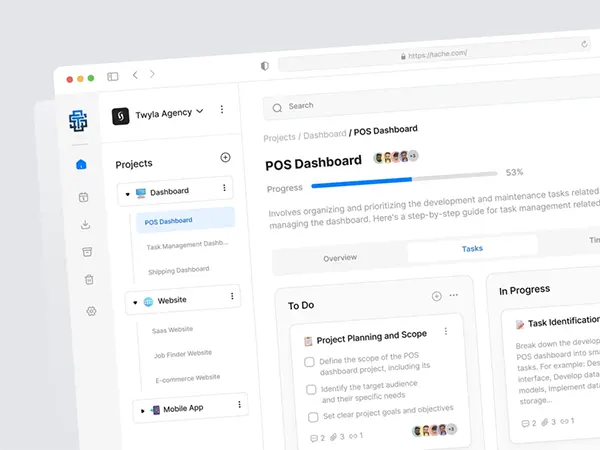
Asana, Trello, and ClickUp help track and manage projects. Your team lead can see who is doing what and when it’s due, so there are no delays from miscommunication.
Automation Tools
Reminders, status updates, moving data from one tool to another – these are the kinds of repetitive tasks that eat up your time.
In fact, Zapier, Make, or Power Automate can handle them, so you can stop juggling the same steps.
Connect your tools once, and let automations do the busywork.
Document Workflow Tools
A perfectionist’s nightmare: hunting for a working document across five chats and three cloud storage tabs.
Three tools fix most of it. Google Drive stores everything in one place, Notion keeps processes and docs together, and PDF Services handles the PDF workflow end – merging and formatting files.
That’s your document workflow management sorted without building anything complicated.
Communication Tools
If your team still runs on long email threads – no judgment, but there’s a better way.
Quick approvals and announcements will improve teams’ alignment without extra meetings.
Conclusion
Improving workflow efficiency means making work easier and faster. When teams use workflow optimization and choose the right tools, they save time and achieve better results.
If you ran a team survey and people say work feels easier and faster: congrats, improving workflow efficiency went according to plan.
Small changes – automating a routine task, cleaning up document management – add up faster than expected. And for the business, that workflow optimization translates into better results and healthier margins.
FAQ
- Process mapping
- Task automation
- Standardization
- Continuous performance tracking