How Acumatica Pricing Works for Growing Companies: A Practical Guide Before You Budget
Jump To Key Section
- Why Acumatica Pricing Feels Different From Traditional ERP Pricing
- The Three Main Factors That Shape Acumatica Cost
- Software Cost Is Only Part of the Budget
- Common Hidden Costs Growing Companies Should Watch
- A Practical Way to Budget for Acumatica
- Why Acumatica Can Make Sense for Growing Companies
- Conclusion: Build Your Acumatica Budget Around Growth, Not Just Software Cost
- FAQs

“Beware of little expenses. A small leak will sink a great ship.”
— Benjamin Franklin (US Founding Father)
ERP pricing often looks straightforward at first glance. Then the real questions begin. What happens when your team grows? Which modules are actually necessary? How much will implementation, integrations, and training add to the total bill?
Here comes Acumatica pricing. And it’s getting really popular among growing companies. Unlike many traditional ERP systems that charge heavily based on user count, Acumatica uses a more flexible structure tied to business usage, applications, and operational needs. For companies planning to scale, that can feel refreshing. It can also feel difficult to estimate without understanding the moving parts behind the quote.
Before comparing vendors or setting an ERP budget, leadership teams need a clear picture of how Acumatica pricing actually works in practice, not just on a sales sheet.
In this guide, I’ll explain how this pricing works for growing companies, including modules, transaction volume, implementation costs, hidden expenses, and budgeting strategies before choosing an ERP.
KEY TAKEAWAYS
- Acumatica pricing is typically based on business usage, applications, and resource needs rather than only user count.
- During budgeting, ERP implementation costs are as important as software costs.
- Hidden expenses like data migration, integrations, training, and post-launch optimization can significantly affect total cost.
- A phased, layered budgeting approach helps growing companies scale ERP investment more effectively over time.
Why Acumatica Pricing Feels Different From Traditional ERP Pricing
Many ERP systems rely on a per-user pricing model. At first, that may seem simple. But for growing businesses, it can quietly discourage collaboration because every added employee becomes another recurring expense.
For example, a distribution company may want warehouse staff, sales reps, finance users, managers, and executives to access the ERP in different ways. In a per-seat model, every added user can become another recurring cost. So companies sometimes:
- Limit access
- Share logins
- Keep some teams outside the system
Why then even have a connected ERP in the first place?
Rather than simply charging for every named user, Acumatica takes a different approach as it’s built around:
- Business usage
- Selected applications
- Projected resources
- Licensing/deployment choices.
That is one reason it appeals to companies that want broader system access without feeling punished every time the team grows. In other words, how Acumatica pricing works for growing companies is closely tied to usage, operational complexity, and the functionality the business actually needs.
This does not mean Acumatica is automatically cheap. It means the pricing conversation is different. Instead of only asking, “How many users do we have?” companies need to ask, “What do we need the system to do, how much activity will run through it, and how complex will implementation be?”
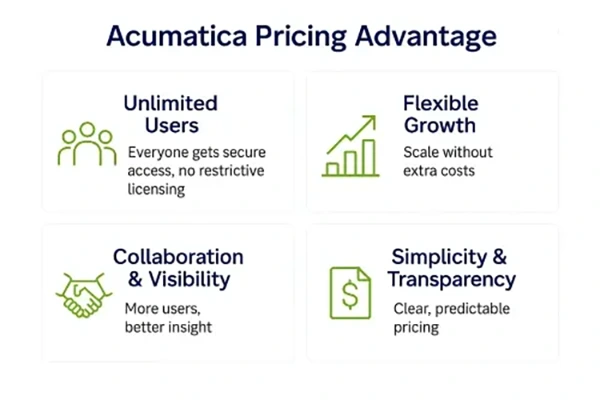
The major benefits of this pricing are as follows:
The Three Main Factors That Shape Acumatica Cost
Three factors – Applications/Modules, Resources/Activity, Licence/Model – majorly shape this pricing.
1. Applications and Modules
The first cost driver is the functionality your company needs.
A business that only needs core financial management will have a very different quote from a company that also needs inventory, order management, warehouse management, manufacturing, project accounting, CRM, field service, or advanced reporting.
This modular structure can be helpful because growing companies do not always need everything on day one. You may start with finance, distribution, or project accounting, then add more functionality later as your operations mature.
But there is a budgeting lesson here: every “nice-to-have” feature can become a real budget line. A company should separate must-have modules from future-phase modules before requesting pricing. Otherwise, the quote may become bigger than expected because the scope includes too much too soon.
2. Projected Resources and Business Activity
The second major pricing factor is projected resource usage. This can include transaction volume, storage, API activity, and the general level of operational activity running through the system.
A company processing a few thousand transactions per month has a different resource profile than a fast-growing distributor handling high order volume, multiple warehouses, large product catalogs, and frequent integrations with ecommerce or shipping platforms.
This is where growing companies need to be honest with themselves. Underestimating transaction volume might make the initial quote look more comfortable, but what if the business quickly outgrows that resource level? On the other hand, overestimating everything can lead to paying for capacity that is not yet needed.
The smarter approach is to forecast realistically. Look at current transaction volume, expected growth over the next 12 to 24 months, and any major expansion plans such as new locations, ecommerce growth, acquisitions, or additional product lines.
3. License and Deployment Model
The third factor is the license or deployment option. Acumatica can be deployed in different ways depending on business needs, including cloud-based subscription models and other deployment structures. The right choice can affect cost, flexibility, ownership, and long-term planning.
For most growing businesses, this part of the decision should not be made only by comparing monthly fees. It should also consider IT resources, security requirements, compliance needs, internal support capacity, and how much control the company wants over its environment.
Software Cost Is Only Part of the Budget
One of the most common ERP budgeting mistakes is focusing entirely on software subscription fees.
That is like saying a car costs just what’s there at the sticker price, ignoring insurance, maintenance, fuel, and registration. With ERP, the subscription matters, but implementation often carries just as much weight, especially in the first year.
Implementation costs can include:
- Discovery and process review
- System configuration
- Data migration and cleanup
- Integrations with existing tools
- Workflow adjustments
- Reporting setup
- User training
- Testing and go-live support
- Post-launch optimization
A clean, simple implementation with standard processes will cost less than a project involving multiple entities, messy legacy data, custom workflows, ecommerce integrations, manufacturing processes, or complex reporting requirements.
This is why two companies can choose the same ERP platform and still receive very different total cost estimates.
Common Hidden Costs Growing Companies Should Watch
Hidden ERP costs rarely appear in the first conversation, but they often shape the real budget later.
- Data migration is one common hidden cost. If your customer records, inventory data, chart of accounts, vendor lists, or transaction history are messy, someone has to clean and map that information before it moves into the new ERP.
- Integrations are another major factor. You need to connect with e-commerce platforms, CRM systems, payroll tools, shipping software, banking systems, reporting platforms, or industry-specific applications. Even when connectors exist, integrations still require planning, testing, and maintenance.
- Training is also easy to underestimate. A company can buy excellent software and still struggle if employees do not understand how to use it properly. Good training reduces errors, improves adoption, and helps teams get value from the system sooner.
- Finally, businesses should plan for post-go-live improvements. The first version of an ERP implementation should not try to solve everything. Once the company starts using the system in real life, new reports, workflow improvements, and process refinements usually become clear.
A Practical Way to Budget for Acumatica
A practical ERP budget works best when viewed in layers rather than one flat number.
- The first layer is the software subscription. This includes the applications, resource level, and license model needed to support the business.
- The second layer is implementation. This includes configuration, migration, integrations, training, and launch support.
- The third layer is ongoing optimization. This includes support, future modules, added storage or resources, new integrations, process improvements, and additional training as the company grows.
This layered approach gives leadership a more realistic view of total cost instead of focusing only on the first quote.
It also helps prevent scope creep. If a feature is not needed immediately, it can be moved into a later phase. That keeps the initial project focused and gives the company room to learn before adding more complexity.
Why Acumatica Can Make Sense for Growing Companies
One of Acumatica’s biggest advantages is that its pricing structure aligns well with operational growth. As it’s not built purely around charging every individual user, companies can often give broader access to teams without the same fear of user-based cost spikes.
That matters because ERP works best when people actually use it.
Finance needs accurate numbers. Operations need visibility. Sales needs customer and order information. Leadership needs reporting. Warehouse teams need inventory accuracy. When more of the business works from the same system, decisions become faster and cleaner.
For a growing company, that kind of visibility can be worth more than simply choosing the lowest-cost software.
Conclusion: Build Your Acumatica Budget Around Growth, Not Just Software Cost
Acumatica pricing is not designed as a one-size-fits-all ERP model, and that flexibility is both its biggest strength and its biggest source of confusion for buyers.
The cost depends on the applications you choose, the resources your business needs, your transaction volume, your deployment model, and the complexity of implementation. The best approach is to look beyond the subscription and build a full budget that includes migration, integrations, training, support, and future optimization.
For growing companies, Acumatica’s structure can be a major advantage. It gives businesses room to expand access, add capabilities over time, and align ERP investment with real operational needs.
The key is to plan carefully. Start with the processes that matter most, estimate activity honestly, avoid unnecessary customization, and budget for the full journey — not just the software license.