WhatsApp Bulk Messaging Restrictions in 2026: Why Manual Messages Can Be Flagged
Jump To Key Section
- What Happened in the October 2026 WhatsApp Restriction Case?
- What WhatsApp Actually Says About Business Messaging Restrictions
- Five Things to Check Before Sending Customer Messages
- What Should You Do if WhatsApp Restricts Your Business Account?
- When Does a WhatsApp Sender Make Sense?
- When Is a Browser-Based Extension Sufficient?
- Which WhatsApp Messaging Approach Fits Your Business?
- Responsible Messaging Starts Before You Click Send
- Frequently Asked Questions
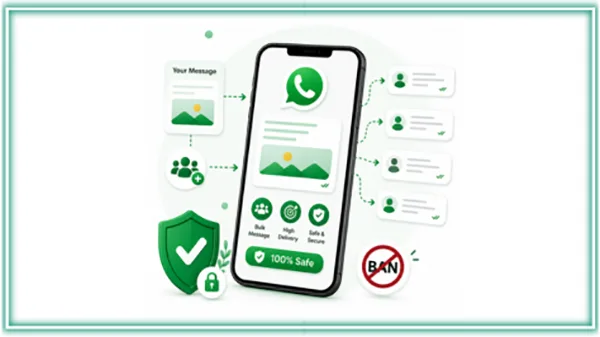
Sometimes a business receives an account restriction even after sending every WhatsApp message manually. This is unusual, but if an employee opens WhatsApp Web, selects a customer, and types an appointment reminder, how could the account be associated with unauthorized automation or bulk messaging?
The thing is that manual sending does not automatically establish compliance with WhatsApp’s business messaging policies. WhatsApp is more than software to send a message. It is advised that businesses also make sure that all recipients communicate, respect opt-out requests, and avoid messaging practices that violate the platform’s rules.
What Happened in the October 2026 WhatsApp Restriction Case?
On October 8, 2026, a business user described getting a temporary restriction in the WhatsApp Business App.
According to the Reddit post, employees had been sending appointment reminders manually through WhatsApp Web. The account also used a coexistence configuration covering the official WhatsApp Cloud API.
The warning meant to tools that might not comply with WhatsApp’s rules for automated or bulk messaging.
The user questioned whether manually sending dozens of the same reminders, the coexistence configuration, or another problem could explain the restriction.
A later comment added an essential detail: the business had previously experienced restrictions while using Evolution API, an unofficial integration, before migrating some phone numbers to the next provider using the coexistence model.
That history complicates the explanation of the case.
The discussion does not establish whether the recent restriction resulted from current messaging practices, historical account activity, connected tools, or the next factor.
It also does not establish that sending 51–100 messages leads to restrictions. The number appeared in a question about a possible threshold, not as a verified enforcement rule.
The case illustrates why businesses should investigate their whole messaging setup instead of assuming that manual sending, by itself, guarantees account safety.
What WhatsApp Actually Says About Business Messaging Restrictions
WhatsApp’s Business Messaging Policy, updated in September 2026, applies to both the WhatsApp Business App and the WhatsApp Business Platform.
Multiple requirements are particularly relevant to outbound customer communication.
Recipient permission matters
Businesses may contact people when they have received the needed contact details and appropriate opt-in permission.
Having a customer’s phone number is not enough on its own.
For instance, someone who provides a phone number for an appointment may expect booking-related communication but not actually unrelated promotional campaigns.
Businesses should make the purpose of their messages clear when gathering permission.
Opt-out requests must be respected
If someone asks to stop receiving WhatsApp messages, businesses must respect that request.
An employee sending messages manually does not shift this obligation.
Contact lists should therefore be checked for previous opt-outs before another sending task starts.
Negative feedback can affect accounts
WhatsApp states that user reports, blocks, policy violations, and other good information can contribute to enforcement decisions.
The platform may limit messaging capabilities or eliminate access when it determines that business messaging practices violate its rules.
WhatsApp also reserves the right to act against unauthorized messaging.
However, its public business messaging policy does not offer a universal number of manually sent messages that guarantees an account will stay unrestricted.
Businesses should differentiate between confirmed policy requirements and community theories about specific detection signals.
Five Things to Check Before Sending Customer Messages
For teams preparing appointment reminders, order updates, or other customer communications, a basic review process can prevent serious mistakes.
1. Check why each customer is being contacted
Every message should have a clear goal.
If a customer wants an appointment reminder, the message should relate to that appointment.
If the business plans to send a promotion, it should confirm that the recipient has agreed to receive that category of communication.
These distinctions should be displayed in the contact list.
2. Review the message content
Relevant messages are more helpful than generic outreach.
Consider an appointment reminder:
“Hi Sarah, your appointment with Greenfield Dental is scheduled for Thursday at 2 PM. Please contact us if you want to reschedule.”
The message involves a specific reason for contacting the customer and a relevant next step.
By comparison, an unexpected promotional message sent to an old contact list may not tally the recipient’s expectations.
Adding names or different wording should never be treated as a technique for bypassing platform restrictions.
Personalization should improve the information customers receive.
3. Remove outdated or ineligible contacts
Before sending, employees should review:
- Duplicate phone numbers
- Incorrect country codes
- Cancelled appointments or completed requests
- Customers who have opted out
- Contacts without the required permission
This helps ensure that communication stays relevant and prevents unnecessary repeat messages.
4. Review connected applications and account history
Businesses using WhatsApp Web, third-party tools, and the official Cloud API should document their recent configuration.
If the account has previously used an unofficial API or other integration, that history may be related to an investigation.
However, discovering a previous integration does not automatically mean that it caused the latest restriction.
Teams should record changes to connected applications, migration dates, and recent account warnings.
5. Maintain useful sending records
Keep enough information to explain why a message was sent.
| Record | What to document |
| Recipient permission | When and how permission was obtained |
| Message purpose | Appointment reminder, requested update, or promotion |
| Sending channel | Business App, WhatsApp Web, or Business Platform |
| Activity | Date, relevant campaign, and sending status |
| Customer feedback | Replies, opt-outs, or reported problems |
These records can help employees investigate communication problems and prepare relevant information if a review is required.
They do not guarantee that WhatsApp will approve an appeal or restore an account.
What Should You Do if WhatsApp Restricts Your Business Account?
The quick response should be investigation, not switching to another bulk messaging tool.
Step 1: Pause the affected sending activity
Stop the actual outbound campaign or automated workflow while reviewing the warning.
Avoid attempting to work around the restriction through other extensions, accounts, or unofficial integrations.
Step 2: Identify which account or service is affected
A restriction in the WhatsApp Business App is not always the same as a policy enforcement action against a WhatsApp Business Account on the official Business Platform.
Read the notification carefully.
Record the actual warning, the time it appeared, and whether sending, receiving, or account access has been affected.
Step 3: Review recent activity and configurations
Inspect recent outbound messages, connected applications, account changes, and available policy notifications.
For accounts using both the Business App and Cloud API, document the configuration and any latest migration steps.
Also review good consent records and customer complaints.
The objective is to identify facts that might help explain the situation instead of guess at WhatsApp’s internal detection rules.
Step 4: Use the appropriate official review channel
If the WhatsApp Business App is banned and the application provides a Request review option, submit the request through the app.
For a WhatsApp Business Platform restriction, review the policy problem through the relevant Meta business management and support tools, including Business Support Home where available.
The review options may vary depending on the restriction type.
Third-party services cannot guarantee that an account will be unbanned.
Step 5: Correct problems before resuming
If the review shows missing permissions, outdated contact records, unsuitable message content, or an incompatible integration, address the problem before restarting the affected activity.
Adjusting message intervals or changing extensions is not a substitute for resolving a policy issue.
When Does a WhatsApp Sender Make Sense?
Account restrictions and sending efficiency are different issues.
A business may have a right reason to contact customers and a properly reviewed recipient list, yet still spend a good amount of time preparing messages manually.
For that operational issue, a sender tool can help organize the work.
RocketSender provides a WhatsApp Sender workflow that combines contact importing, personalized message preparation, and a web dashboard. Employees prepare campaigns in the dashboard, while sending takes place through a Chrome extension in WhatsApp Web.
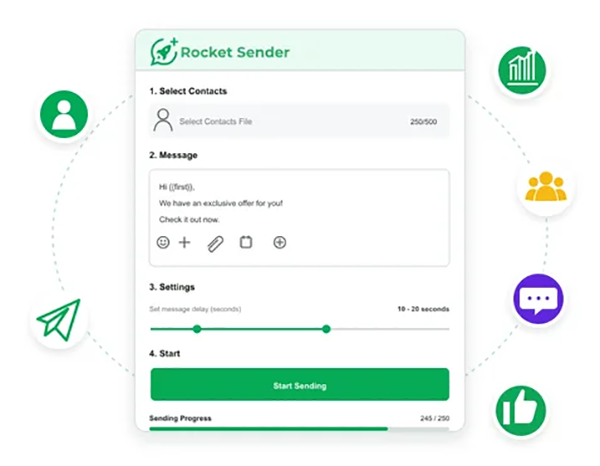
This can be helpful for teams that want a larger workspace to review an outgoing messaging task.
However, RocketSender is a third-party WhatsApp Web tool, not an official WhatsApp Business API integration.
Using it does not guarantee compliance, avoid account restrictions, or make otherwise unauthorized bulk messaging acceptable.
Businesses should check whether this sending method is appropriate under the applicable WhatsApp terms and policies before using it.
When Is a Browser-Based Extension Sufficient?
Some small businesses prepare an outgoing task directly within WhatsApp Web.
For instance, a training provider may maintain a spreadsheet of students who have agreed to receive upcoming course information.
After verifying permissions and confirming that the details are correct, employees may want to import the list, personalize messages, and monitor sending progress.
The WA Bulk Message Sender Chrome extension supports Excel contact imports, personalization variables, adjustable sending intervals, pause-and-resume controls, and sending-result exports.
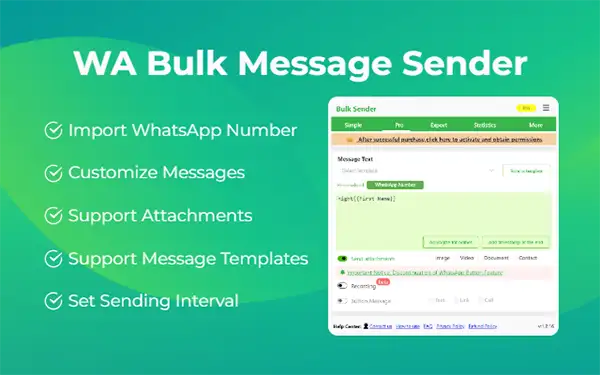
These features can minimize repetitive preparation and make an active sending task easier to review.
They are not account-protection features.
In particular, sending intervals should not be presented as a way to remove WhatsApp’s enforcement systems, and a successful sending result does not prove that recipients welcomed the message.
Businesses needing official application integrations, approved messaging templates, or programmatically triggered transactional notifications should check the WhatsApp Business Platform.
Which WhatsApp Messaging Approach Fits Your Business?
The appropriate beginning point depends on the communication requirement.
| Business requirement | Option to evaluate |
| Individual customer conversations | WhatsApp Business App |
| Preparing outbound messages from a reviewed contact list | Browser-based sender, subject to applicable terms |
| Organizing campaign preparation in a larger workspace | Sender with web dashboard |
| Recurring notifications triggered by booking or order systems | Official WhatsApp Business Platform |
| Shared conversation histories and sales ownership | CRM with suitable WhatsApp integration |
A browser-based sending tool and an official API integration function differently. Businesses should not assume that the permissions, features, or account needs of one apply to the other.
Responsible Messaging Starts Before You Click Send
The October 2026 discussion shows an important limitation of judging WhatsApp account risk solely by how a message was sent.
Manual messaging does not guarantee compliance. Browser extensions do not guarantee protection against restrictions. And an official API integration still requires businesses to follow the applicable rules.
The practical response is to review recipient permissions, message relevance, connected systems, and account notifications before selecting a sending workflow.
Once those requirements are understood, accurate tools can make legitimate communication tasks more organized.
The goal should not be finding a sending method that avoids detection. It should be building a messaging process that customers want and that the business can explain and manage responsibly.
Frequently Asked Questions
Ans: Yes. Manual sending does not exempt businesses from messaging policies. However, only the relevant account information and review process may help clarify the circumstances of a specific restriction.
Ans: No universal number guarantees protection from restrictions. Businesses should follow the requirements applicable to their chosen messaging channel and avoid relying on community estimates as official rules.
Ans: No. Sender extensions provide operational features such as contact importing, message personalization, and sending controls. They do not guarantee account safety or immunity from enforcement.
Ans: The official WhatsApp Business Platform may be appropriate when reminders need to be triggered automatically by a booking system. Businesses should evaluate the relevant template requirements, recipient permissions, implementation needs, and costs.