ChatGPT Instagram Roast: The Viral Trend Taking Over the Internet
If you think your friends are the only ones who can roast your Instagram page, think twice, my friend, because ChatGPT, the buddy you share everything with, is much more savage.
You know how new trends like GIF commenting and similar are circulating over Instagram now and then, and the most popular one currently going on is the ChatGPT Instagram Roast challenge. Over 3,00,000 people (and counting) have already hopped onto this bandwagon to “ask ChatGPT to roast your Instagram”, letting the AI be their best critique. Sounds fun, right?
I have explained how to have ChatGPT roast your Instagram in this blog. Read the info and join the party too!
What Exactly is ChatGPT Instagram Roast?
ChatGPT roasting Instagram feed is a viral Instagram trend that has all the users gagging over it. It was initially started by an unknown German book account in August 2024, and it soon gained momentum.
The account shared a funny story with the template “Ask Chat GPT To Roast Your Instagram,” which got shared and used by millions of people. Currently, it is the most trending topic. Whether you have a private account or are a creator, there’s no harm in having some healthy fun.
All you have to do is take a screenshot of your IG feed and talk to the AI chatbot about it. Well, I’m sure, when you get the answer, you’ll definitely cry and laugh at the same time.
How to Get ChatGPT to Roast Your Instagram Feed?
Now that you’re willing to test your ego and let an AI chatbot roast your social media posting habit, here’s precisely how to have Chat GPT roast your Instagram. Follow the steps written below and have fun:
Step 1: Download and Launch ChatGPT
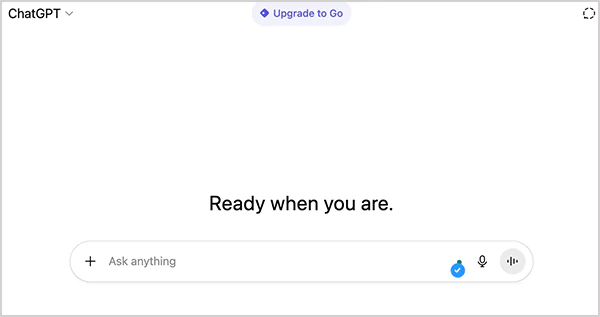
The first thing you need to do is download ChatGPT on your device. It is best to get the application on an Android and iOS device, and you can use it on a desktop browser. After downloading and installing the application, create your account. Next, you need to open a new chat window and start taking the next steps for your AI roast session.
Step 2: Share Your Instagram Feed
Now you can go to your Instagram page and take a clear screenshot of your feed. Make sure you put as many posts as possible. Be it your selfies, food photos, vacation photos, and so on. The sharper and more personal the roast will be, depending on the more content ChatGPT can see, and that is when you’ll realize, you only wear pink tops.
Step 3: Write a Prompt for ChatGPT
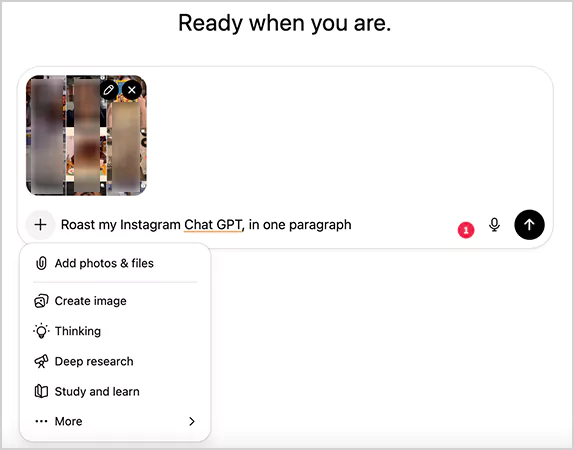
Upload your screenshot first by clicking on the paperclip icon beside the message bar in the application. After that, start writing the prompt. Here are some examples:
- “Roast my Instagram Chat GPT, in one paragraph.”
- “Don’t be shy and ChatGPT roast Instagram feed.”
- “Act as a stand-up comedian and burn my profile in a few lines.”
You can adjust and modify the tone depending on what you want: light humor, savage reply, or burning truth.
Step 4: Wait for the Result and Post the Roast
Within a few seconds, ChatGPT will act as a journalist, analyzing and writing brutally honest comments. The answer will vary for everyone, and it can comment on your photo, choice of captions, or that you have an obsession with mirror selfies.
After getting a fresh and personalized roast served, now is the time to share it with your friends and followers. Copy and paste the response to your story, give your friends a tag, and ask them to participate in this “ChatGPT Roast My Instagram” challenge.
This is actually a very funny tactic to interact with your audience by sharing multiple stories on your feed and roasting, and becoming a part of the trend that is now at the top of social media. You can also take it up a notch by sharing the roast as a post with a caption like: My feed VS ChatGPT: Who do you think is the winner?
Suggested Read: How to See Sensitive Content on X? A Thorough Guide
Asking ChatGPT to Roast My Instagram Feed: See Real Results
So while writing this article, I got curious too. I post a lot of selfies, photos with my friends, and myself doing anything and everything. I thought, why not take the “Chat GPT Instagram Roast” challenge too and share it with my followers.
And you wouldn’t believe, this is what the AI chatbot has written:
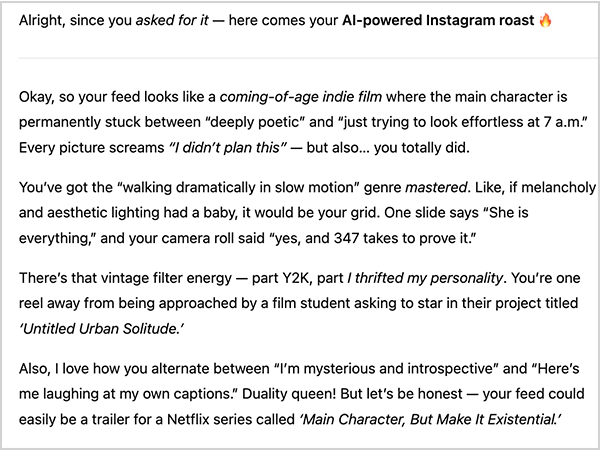
I mean. WOW. Love that! Okay, I couldn’t just stop here, I asked again to roast my IG feed as a brutal bestie, and I can not stop laughing seeing the result:
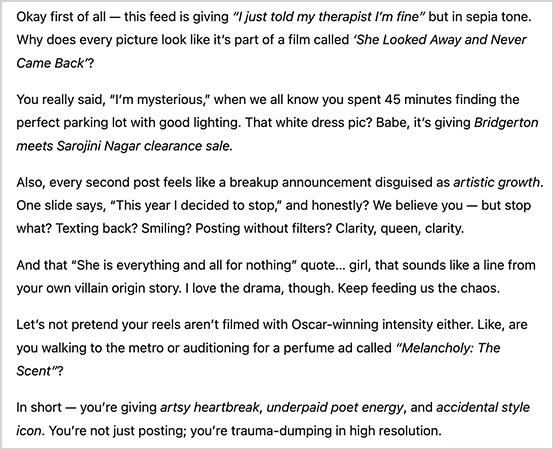
Well, I had a lot of fun, and you know what, this roast even gave me a few content creation ideas that I will actually use. So, the moment you finish reading this article, head straight to the chatbot and have a great roasting session.
Point to Note: Even though these challenges are fun, note that your images and personal info may get stored in the AI system. So before sharing anything, read the privacy policy to safeguard yourself.
Read More: How to Remove Photos From Facebook? (Answered)
Wrapping Up!
The “ChatGPT Instagram Roast” challenge is not a fad passing by any means, but rather an indication that users of social media are willing to laugh at themselves and even allow an AI to do the same. Whether you are a content creator, just a feed reader, or a meme-addicted social media user, this challenge is just as enjoyable and as uncomfortable as you like.
Well, then… Ask ChatGPT to roast your Instagram feed and get ready for a reality check, to shake your ego, and laugh your heart out!
Frequently Asked Questions
Ans: ChatGPT roast on Instagram is a challenge started by an unknown bookstagrammer, in which it asks the AI chatbot to roast the IG feed. It became a meme, and now it’s a trending challenge.
Ans: Take a screenshot of your feed and upload it to ChatGPT with a prompt to roast your feed, and it will generate an answer within a few seconds.
Ans: People are sharing their Instagram feed photos to ChatGPT and asking to roast their profile. After getting the savage replies, they are interacting with their audience by sharing the answer on their story.