Image to Video AI: Turn Static Pictures into Moving Clips
In today’s digital landscape, turning images into moving clips has become much easier. Creators, businesses, and individuals are greatly using these tools to boost their profiles and engagement.
But still, many of the traditional creators struggle to bring life into images. Traditional editors use manual procedures and complex animation tools that take much of their time. And this same issue gets resolved with video AI tools that turn pictures into captivating videos within seconds.
Ready to learn how it works? Keep reading this article that shares what image-to-video AI is, how it works and what the best practices are to get optimum results from it.
Key takeaways
- Using Video AI, users can generate videos from photographs, saving much of the cost required for a video shoot.
- Reducing manual work, the video that might need weeks may be generated in a single day or a few hours of effort.
- E-commerce and product marketing platforms are the ones that are taking the most advantage of this technological advancement.
What Is Image-to-Video AI?
Image to video AI takes a single static image and animates it into a flawless video clip while conserving the identity, mixture, and style of your original frame. Image-to- video keeps full control over your subject—the character’s face stays constant, the product stays on-brand, and the scene keeps its original look, unlike text-to– video models that create visuals from the beginning.
The technology has improved rapidly. While improved motion clarity means fast-moving films no longer lapse into visual noise, enhanced behavioral modeling removes the vibration and structural tilt that afflicted previous generators.
Why Transform Images to Video?
The use cases are expanding rapidly:
E-commerce and product marketing lead the charge. Turn product photography into dynamic video ads—a static shoe image becomes a rotating hero shot; a perfume bottle gains subtle reflections and atmospheric mist. Brands find that animated product content drives significantly higher engagement than still images.
Social media creators face a constant request for new videos. Using slow motion, drifting clouds, shaking vegetation, or dramatic reveals, turn your best pictures into thumb-stopping Reels and TikToks.
Character animation and gaming benefit greatly. Bring illustrated characters to life for trailers and promotional materials. Cloaks flutter, hair flows, and expressions shift naturally while maintaining character consistency.
Creative storytelling becomes rapid prototyping. Sketch a storyboard frame, animate it, and evaluate the motion before agreeing to full production.
The All-in-One Solution for Image-to-Video
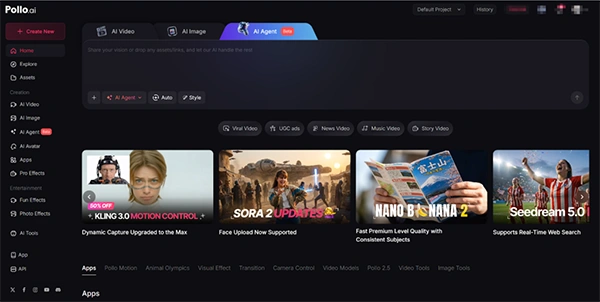
Pollo AI has emerged as a comprehensive powerhouse for image-to-video transformation. As an all-in-one platform, it aggregates access to multiple leading models—including Luma AI, Runway, and Kling—all within a single dashboard.
What makes Pollo AI particularly effective is its “no-edit” philosophy combined with professional results. Upload your image, select from hundreds of pre-designed animation templates, and generate. The platform handles everything: motion design, timing, transitions, effects, and platform optimization.
The Professional Mode deserves special attention. Toggle this on for significantly reduced flickering and frame-to-frame consistency—the difference between “AI-looking” and genuinely cinematic results. In testing, Pollo AI kept environments stable while animating subjects, avoiding the “melting background” problem common in other generators.
The mobile app extends this capability to smartphones, enabling on-the-go content creation. Capture a photo, open the app, apply a template, and generate video content for Instagram. Available on both iOS and Android, Pollo AI puts professional image-to-video conversion in your pocket.
Best Practices for Better Results
Start with quality source images. Resolution, composition, and clarity directly impact animation quality. Well-composed photographs with clear subjects provide more animation opportunities.
Focus prompts on motion, not redesign. Effective prompts describe how things move: “Camera slowly pushes in, cloak flutters in the wind, sparks drift across frame.” Less effective prompts try to change the subject.
Consider motion context. Some photographs naturally suggest movement—landscapes invite panning, portraits suggest subtle animation, action shots benefit from enhanced dynamics.
Use negative prompts. Adding “extra fingers, deformed limbs, blurry background, morphing” can dramatically improve output quality.
Your static images contain untapped potential. Image-to-video AI solves it—transforming photographs into powerful visual content without animation skills or complex software. Whether you’re a marketer, creator, or storyteller, the line between “still” and “moving” has never been lower.
Conclusion
Image-to-video AI has resolved the complicated task of manual editing, and creating a video that consumes much time. The video that may take 4 to 5 days of effort can be made easily using video AI. It converts photographs into videos simply.
Simply, the image needs to be uploaded, and some options need to be selected according to the requirement and the video will get ready in just a few minutes.
When used with the best strategies, video AI can help individuals and businesses to create engaging and curative videos that might take weeks to be generated manually.
Ans: Yes, many of these tools are free to use. But some might ask for charges for using premium features or to generate more videos than the set limit.
Ans: Businesses can generate interesting and unique videos with very little effort and post them on their social handles and websites to attract more users.
Ans: Providing detailed prompts and high-quality images usually improves the quality of the generated videos.