How to Reduce AI Drama Production Costs and Rework
Jump To Key Section
- Where Drama Production Loses Money
- What Is Seedance 2.5 Draft Mode?
- Less Rework in Three Steps With Seedance 2.5 Draft
- Catch Performance Problems Early
- Settle the Mood Before You Polish
- Fix Camera Choices Before They Cost You
- Use Short Feedback Loops
- Build a Simple Approval Checklist
- The Numbers Behind the Savings
- Final Review Before Delivery
- Conclusion: Spend on Drama, Not on Do-Overs
- Frequently Asked Questions
Drama is important to make day-to-day life exciting! Consider small yet big moments of intense emotional and behavioral turmoil. These are points where we want positive outcomes with enough twists and turns. But drama production costs can considerably escalate when it comes to doing it through AI platforms.
If we consider Dreamina, Seedance 2.5 Draft allows you to test dramatic scenes in high quality, like in 480 previews, along with fixing problems earlier. It also helps you generate a native high-resolution 1080p final only or the take you can put your trust on. Let’s have a comprehensive look in the following read.

Where Drama Production Loses Money
Rework is the quiet budget killer, to be honest. A performance that feels flat, a camera move that distracts, or, even more importantly, a lighting choice that clashes can all force a re-render.
The later you catch these problems, the more they become costly. The goal is to find them while changes are cheap and thus under budget.
Make Every Reaction Count
Small gestures frequently carry more emotion than dialogue. Use Draft previews to test pauses, glances, and subtle changes in expression for effective results. Refining these details early helps preserve the scene’s emotional impact without spending on repeated full-resolution renders without desired outcomes.
Keep Scenes Visually Consistent
A dramatic scene requires continuity in lighting, framing, and character movement. Compare Drafts to find suitable camera angles and visual tones that support the story. Once everything feels right in place, move your strongest take to native 1080p and review the final details before delivery.
What Is Seedance 2.5 Draft Mode?
Seedance 2.5 Draft is a preview-first workflow in Dreamina for better outcomes. You generate 480p Drafts, select the best take and then create a fresh native 1080p final that reuses the Draft’s prompt, references, seed, aspect ratio and duration.
What it brings to drama work is as follows:
- Consistent results: composition, motion, and camera remain closely aligned from Draft to final.
- Lower iteration costs: US$0.514 per 5-second Draft vs. US$2.843 for a 1080p final.
- Faster finals: 39.3%-57.7% faster than direct 1080p in tests, excluding Draft time for efficiency.
- Dialogue and audio review: check delivery and pacing in the preview section.
Less Rework in Three Steps With Seedance 2.5 Draft
Here is the low-rework workflow in Dreamina for a detailed look.
Step 1: Create a 480p Draft
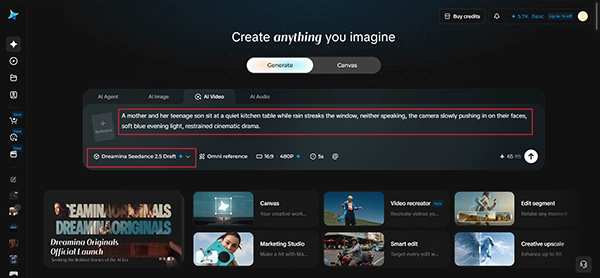
Start a Draft request with your scene description and any image, video or audio references as per your preferences.
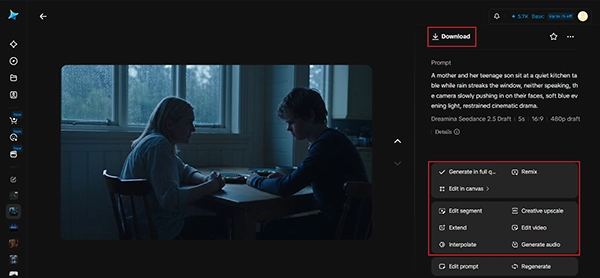
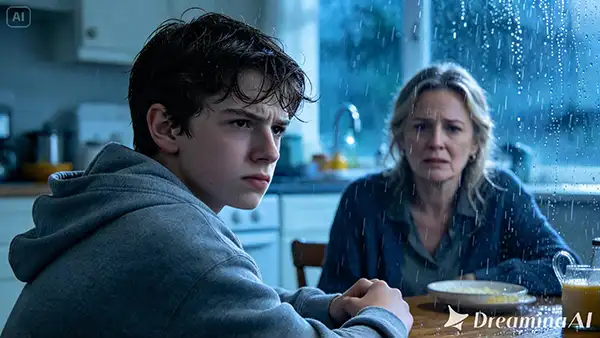
For example: A mother and her teenage son sit at a quiet kitchen table while rain streaks the window, neither speaking, the camera slowly pushing in on their faces, soft blue evening light, restrained cinematic drama with impact.
Set Draft mode on and pick 480p, the supported preview resolution. Then, wait until the Draft succeeds before reviewing the video.
Step 2: Compare takes and choose the shot
Next, fine-tune your settings by picking a model, Seedance 2.5 Draft. You can choose the size of the video as well, for example, 16:9 for a YouTube channel or 9:16 for social media Reels. Lastly, select the duration of the video you desire and click Generate for what you need in your final output.
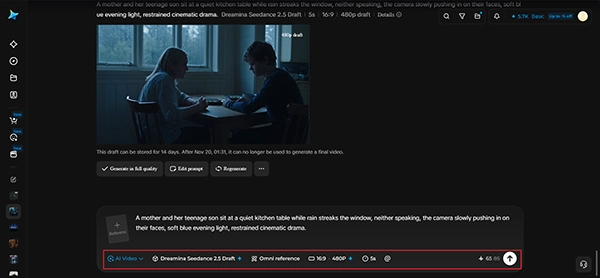
Step 3: Generate and review the final
Next, watch for composition, performance, camera movement, dialogue, audio, and the pacing-related elements as well. Does silence feel heavy or just empty from your point of view? Improve your prompt or references and create new Drafts when you want a different creative direction. Create a final-generation task with the help of the same model and the selected Draft. The model automatically reuses the Draft’s creative conditions for good, so do not resend those inputs. If you want your video quality to improve, just click “Generate in full quality”. Whenever the task succeeds, download and review the newly generated final for continuity, lighting, and detail before delivery.
Catch Performance Problems Early
Performance is the heart of drama from major angles. Check expressions, posture, and reaction timing in your Draft before anything else to improve this aspect.
Watch for:
- Expressions that match the emotion
- Natural eye movement
- Reactions that arrive at believable moments
Settle the Mood Before You Polish
Mood is determined by light, color and sound. A cold blue kitchen recommends distance, while warm lamplight suggests tenderness.
Test two or three moods in separate Drafts. Selecting the right atmosphere early prevents the most frustrating kind of rework: realizing the whole tone is wrong.
Fix Camera Choices Before They Cost You
A slow push-in builds pressure, but at the same time a distant static shot creates isolation. Each choice changes how the scene feels at the moment.
Compare camera ideas using inexpensive previews quickly. If a move feels too showy for a quiet scene, soften it and test again.
Use Short Feedback Loops
The faster you can get your notes, the less rework you create later on. Share Drafts with your director, writer, or client right away for the better.
Because Seedance 2.5 Draft previews are quick, you can fold feedback into a new round the same day instead of waiting for a full render in the end.
Build a Simple Approval Checklist
Before a Draft moves to final, confirm a few basics:
- Does the performance serve the scene?
- Do mood, light and sound agree?
- Does the camera support the story?
A short checklist turns vague opinions into clear decisions for better workflows.
The Numbers Behind the Savings
In the modeled example, eleven Drafts plus one final cost about US$8.497, roughly 73% less than eleven direct 1080p renders. At 20 takes, the modeled saving reaches 77% versus direct Seedance 1080p.
Less rework means more of your budget goes to the scenes that matter most for you and your audience.
Final Review Before Delivery
When the native 1080p final succeeds, review continuity, lighting, and detail against the approved Draft. Look closely at faces, because drama depends on them.
Finals can differ slightly from Drafts, so a careful review protects the performance you worked to get the best effects.
Conclusion: Spend on Drama, Not on Do-Overs
Reducing production costs and rework starts with testing before you commit. With Seedance 2.5 Draft in Dreamina, you can refine performance, mood, and camera in 480p, just pick your strongest take, and generate one native 1080p final.
Draft your most important scene first and give your story the room it needs for the best effects!
Frequently Asked Questions
Ans: It uses a preview-first workflow where you test performance, lighting, and camera moves at 480p saving up to 73%–77% on multi-take iterations.
Ans: Yes. Selecting “Generate in full quality” from an approved Draft automatically reuses its prompt, references, seed, aspect ratio, and duration to preserve composition, motion, and camera alignment.
Ans: In tests, rendering a native 1080p final from an approved Draft is 39.3% to 57.7% faster than generating direct 1080p renders from scratch.