How AI-Powered Data Extraction Is Replacing Manual Data Entry
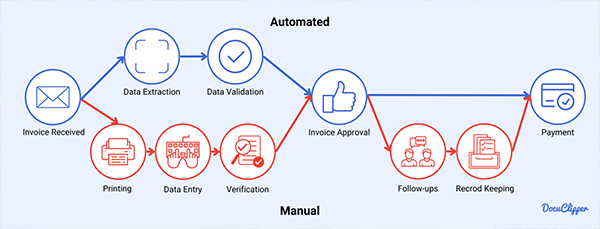
Most of the companies are handling data manually. For example, when you open a PDF, you’ll see the invoice number; type it into the ERP. Then open the next one, find the policy number, and type it into the CRM. When you repeat it a few hundred times, it produces errors nobody notices until a payment bounces or a customer calls to complain.
Now that kind of job is disappearing. It’s not because businesses stopped receiving documents, but because software is now able to read them. Read the full blog to know what has changed, how the technology works, and what to think about before you retire the keyboard-and-spreadsheet approach.
Why Manual Data Entry Hung Around For So Long
For years, automation simplification promised to stop manual keying and kept falling short. Traditional OCR could turn a clean, typed page into text, but it had no idea what the text meant. It couldn’t tell a last date from an invoice date, or a vendor address from a remit-to address. So companies still required people to look at every page and decide which number went where.
The next problem was variety. A mid-sized business might get invoices from 400 suppliers, each with its own layout. Template-based tools required a new rule for every layout, and they broke every time a supplier changed its letterhead.
Many teams find outsourcing to data keying services or hiring temps at month-end much cheaper than maintaining templates.
What’s Different About AI-Powered Extraction
Modern extraction tools combine multiple technologies that used to live separately.
- OCR and ICR turn printed text and handwriting into machine-readable characters.
- Classification models work out what kind of document they’re looking at: an invoice, a claim form, a W-9, a bank statement.
- Language models and trained extractors keep the specific field that is important. It depends on context instead of a fixed position on the page.
- Validation rules check the results against your own data, for instance, whether the PO number exists or the totals add up.
Put together, this is often called intelligent document processing. The key difference from plain OCR is that IDP understands what the text means, not just what it says.
The practical result is that software can now manage documents it has never seen before. A new supplier’s invoice doesn’t require a new template. The model knows what an invoice total looks like.
Where It’s Already Replacing Keyboards
The greatest wins are in high-volume, repetitive work where the same fields come up again and again.
- Accounts payable: invoices, credit notes and remittance advice.
- Insurance and healthcare: claim forms, description of benefits documents and referral letters.
- HR and onboarding: tax forms, ID documents and signed contracts.
- Banking: account-opening packs, loan applications and KYC documents.
- Incoming mail: letters, checks and notices that arrive on paper.
That last one is often ignored. Plenty of businesses digitized their email workflows years ago but still have a person opening envelopes. Now services are managing AI data extraction straight from scanned mail, faxes, and email attachments. After that, they put structured fields into systems like Salesforce or an ERP.
Humans Aren’t Gone, They’ve Moved
It’s tempting to think AI extraction means zero people. In practice, the best setups use a human-in-the-loop model. The software can process everything if it’s confident. Anything below a confidence threshold goes to an exception queue for a person to check.
This changes the job instead of eliminating it. Instead of typing 300 invoices, someone reviews the 20 the system wasn’t sure about. Each correction can feed back into the model, so the exception rate can fall over time.
It also changes what you should calculate. Straight-through processing is important. It means that the share of documents that go from inbox to system without anyone touching them.
Paper is Still the Bottleneck
AI extraction only works on digital files. If companies have those archive boxes sitting on cabinets, they should convert them into digital forms.
This is where document digitization services come in. Good digitization isn’t just scanning. It includes:
- Image cleanup
- Indexing
- Redacting sensitive data where needed
- Delivering files with the metadata your systems expect
Get that step wrong, and even the smartest model will struggle with skewed, low-resolution images.
Questions to Ask Before You Switch
If you’re checking tools or vendors, a few questions will save you pain later.
- What accuracy does it reach on my documents, not a demo set? Ask for a pilot on a few hundred of your actual files.
- How are exceptions managed? Who reviews them, and how fast?
- Where does the data go? Confirm integrations with your ERP, CRM, or document management system.
- How is sensitive data protected? Look for SOC 2, HIPAA, or GDPR alignment, based on your industry.
- Can it handle handwriting and poor-quality scans? Real-world documents are barely clean.
It also helps to look at the wider intelligent document processing setup instead of a single extraction tool. Classification, routing, and storage are important as much as the extraction itself.
The Bottom Line
Manual data entry isn’t dead everywhere, but today it’s increasingly a choice instead of a necessity. AI-powered extraction reads documents in a fraction of the time. It also frees that person for work that actually needs judgment.
The companies getting the most out of it begin small. They pick one high-volume document type, measure the straight-through rate, and expand from there. Within a few months, the question often shifts from whether to automate to what to automate next.
FAQs
Ans: AI such as ChatGPT and Claude are best for extracting data.
Ans: Zapier is often considered the best for data entry.
Ans: There are many tools used for data extraction, such as Apify, Airbyte, and Python libraries.