From Film Negatives to Digital Files: A Practical Guide to Preserving Old Photos
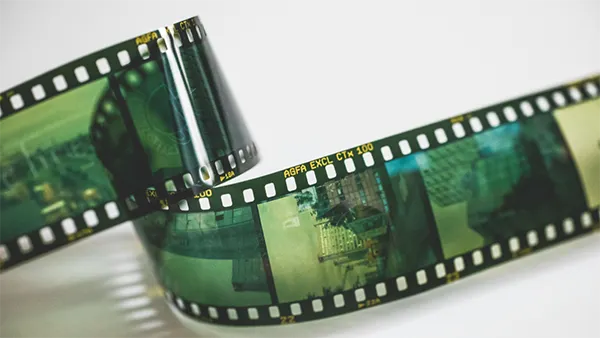
Many closets that you see still hold old cardboard shoeboxes that are filled with forgotten things, which can include thin strips of brown film. These old negatives hold pieces of family history that many people have never seen. Printed photos can fade or lose their color over time, but negatives often keep more of the small details. Some of these pictures were never printed at all. That means there could be special family moments hidden away in those boxes, that are waiting to be bright back again. .
Film emulsion degrades after years of storage. Heat and humidity speed up physical breakdown. Fortunately, modern computer tools solve this problem. You can easily convert negatives to digital photos right at your desk. Digital scans keep those memories safe forever. Fresh digital copies make sharing very simple.
Why Digitize Film Negatives Now?
Standard photo paper loses contrast over decades. Color prints turn yellow, red, or magenta. Negatives usually hold richer highlights and shadows. They protect fine textures that prints lose.
Digitizing turns tiny films into dynamic screens. You can extend the faces of faraway ancestors. Forgotten holidays suddenly appear sharp and bright. A digital file cannot tear or rot. Scanning protects your family legacy from destruction.
Three Ways to Digitize Your Negatives
Every photo collection has different practical needs. Budget and extra time shape your choice. Three trustworthy methods produce great digital copies.
1. Using a Dedicated Film Negative Scanner
An independent film negative scanner provides excellent precision. These devices feature customized internal light panels. Metal or plastic trays hold film flat. Dedicated sensors achieve high optical resolution with ease. Built-in infrared lamps automatically identify dust spots.
Buying a good scanner requires some money. Running film trays takes several minutes. Large family collections require real personal patience. It will take some time to master the configuration program. Even so, the resulting scans look amazing. Serious home archivists usually prefer this tool.
2. Capturing Negatives with a Smartphone
Modern smartphone cameras pack impressive sensor chips. You can scan negatives with everyday gear. This budget method requires minimal extra equipment. You need your phone and even backlighting. An inexpensive tracing lightbox provides clean light. A small tripod keeps phone lenses steady.
Free mobile apps invert negative film colors. However, camera lenses can distort edge sharpness. Ambient room light often causes unwanted glare. Handheld wobbles ruin fine image focus quickly. Dynamic range stays lower than specialized scanners. Still, this option works well for beginners.
3. Hiring a Professional Scanning Service
Professional photo labs handle large image archives. Lab technicians work with high-speed industrial scanners. They clean fragile strips with safe solvents. Trained staff balance colors across every frame. You receive organized files on flash drives.
Sending precious family heirlooms causes genuine concern. Lab fees also increase very fast indeed. Scanning hundreds of frames gets rather expensive. You also surrender personal control over adjustments. Even so, labs save dozens of hours. Busy relatives often welcome that huge ease.
Step-by-Step: How to Digitize Film Negatives
A clear workflow keeps the job smooth. Proper planning avoids repetitive color corrections later. Here is how to digitize film negatives at home.
Step 1: Clean the Film Strips Carefully
Oil from bare skin damages old emulsion. Always wear clean, white cotton gloves. Hold every film strip along its edges. Never touch the middle image frame directly.
On digital scans, dust particles appear huge. Use a rubber air blower and blow on both sides of the film; the air movement should remove loose dust. Use an anti-static camel-hair brush to remove any dust that remains stuck. Never wipe the film with damp household wipes: the water can weaken the emulsion on older film and damage the image.
Step 2: Scan or Photograph the Frame
Place the negative inside your film holder. Make sure the film lies completely flat inside. Bent film strips produce blurry scan corners. Select at least 2400 DPI resolution. Higher resolutions allow future photo prints later.
If using a digital camera, shoot RAW. RAW files retain maximum dynamic light range. Position camera lenses parallel to the film. Dim room lights to eliminate glass glare. Steady tables prevent annoying camera motion blur.
Step 3: Invert the Film Negative
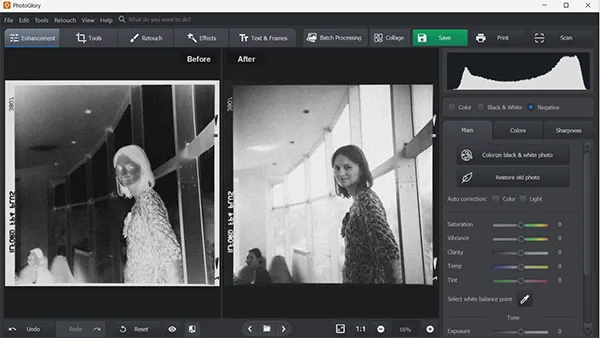
Negative film holds inverted light and darks. Color negative stocks contain a strong orange mask. That base mask looks unusual to beginners. Digital software must flip these inverted tones.
Scanner software often transforms files on capture. Photo editing programs handle conversions via curves. Inverting the tone curve creates positive pictures. Suddenly, real faces and landscapes become visible.
Step 4: Correct Dust and Faded Colors
Raw negative inversions usually look slightly dull. Adjust the white balance slider to fix casts. Increase shadow density to restore deep blacks. Raise the middle tones for natural brightness.
When you digitize old photo negatives, small flaws appear. Use spot healing tools on surface scratches. Click away white dust specks with care. Leave natural film grain preserved for character. Heavy digital smoothing makes human faces look plastic.
Step 5: Save and Export Your Files
Choose your image file formats with care. Save flawless master images as uncompressed TIFFs. TIFF files keep raw visual data preserved. Save smaller copies as standard JPEG files. JPEGs work best for emails and albums. Keep master TIFF files unmodified in storage.
Organizing and Backing Up the Images
Scanning represents only half of the journey. A well-planned archive keeps files easy to find. Create a clean naming habit from day one.
Simple rules keep your digital archive clean:
- Use four-digit years in folder names.
- Add locations or event names alongside.
- Skip unnecessary camera names like “IMG_0042.”
- Add family names inside file metadata.
- Separate final edits from raw master scans.
Follow the trusted 3-2-1 backup strategy:
- Keep three complete copies of files.
- Use two different types of media.
- Place one complete backup copy off-site.
External solid-state drives offer fast local access. Encrypted cloud storage guards against house fires. Redundant storage ensures your hard work lasts.
Proper Storage for Original Film
Never discard scanned physical film negatives. Scanning gear advances with each passing decade. Better digital sensors will appear in time. The physical negative remains your original source.
Avoid old acidic envelopes and wooden boxes. Purchase archival, acid-free plastic storage sleeves. Polypropylene pages protect film from scratch hazards. Slide sleeved pages into durable binder boxes.
Store binders in cool, dry living spaces. High humidity activates destructive mold growth quickly. Heat causes vinegar syndrome in old film. Avoid hot attics and musty crawl spaces. Interior closet shelves offer safe, stable temperatures.
Preserving Family Heritage for Tomorrow
Old film holds moments that time forgot. When you transform negatives to digital photos, you give them a new life. This way, young family members can discover their roots. Don’t forget that the scanning process requires patience and care. Yet, holding digital treasures makes everything valuable. Pick up your film boxes and start today.
FAQs
Ans: You can convert old film negatives into digital photos using a film scanner, a special negative-scanning service, or a camera setup designed for scanning film. Once scanned, you can save the images on your computer or phone and share them with family.
Ans: Digitizing old film negatives helps protect family memories from damage, fading, and loss. Digital copies are also easier to store, share, and print whenever you want.
Ans: Keep film negatives in a cool, dry place away from direct sunlight, heat, and moisture. Store them in sleeves made for photo film, and handle them by the edges to avoid fingerprints and scratches.