How to Tell Whether Your Internet Problems Are Actually Inside Your Home

When your video call freezes, or a webpage takes forever to load, your internet provider is usually the first suspect. But the connection coming into your home is only one part of the equation. Your router, WiFi coverage, connected devices, and even where you’re sitting can affect what feels like “slow internet.”
In fact, WiFi signals can weaken as they pass through walls, floors, furniture, and other obstacles. As per Alibaba, concrete with rebar dents signals by 15–30 dB (97–99.9% power loss); bricks by 60–80%; low-E glass by up to 90%; and even drywall with metal mesh or foil-backed insulation can cause 10–20 dB loss. Aluminum siding, mirrored walls, and HVAC ductwork act as near-total RF shields. That means upgrading your internet plan may do little if the real bottleneck is happening between your router and your device.
So, before calling your provider or comparing internet providers, spend a few minutes figuring out where the slowdown actually begins. The following checks can help you separate an internet service problem from one hiding inside your home network.
Start by Testing More Than One Device
If only one phone, laptop, or tablet is experiencing issues, the problem probably isn’t your internet connection.
Try using another device connected to the exact WiFi network. If everything else works normally, the original device may need a software update, restart, or troubleshooting rather than changes to your internet service.
Testing multiple devices is one of the quickest ways to narrow down the source of the problem.
Check Where the Problem Happens
Does the connection slow down everywhere, or only in certain rooms?
Weak WiFi coverage is usually mistaken for poor internet performance. Thick walls, multiple floors, and large appliances can all reduce your wireless signal, even if the connection entering your home is perfectly stable.
If the problem disappears when you’re closer to the router, improving your WiFi coverage is likely to help more than upgrading your internet plan.
Restart Your Networking Equipment
It may sound obvious, but many connection issues disappear after restarting your modem and router.
Like any piece of technology, networking gear can become less responsive after running continuously for long periods. Restarting refreshes the connection and clears temporary glitches that may affect performance.
It’s a simple step that’s worth trying before looking for more complicated solutions.
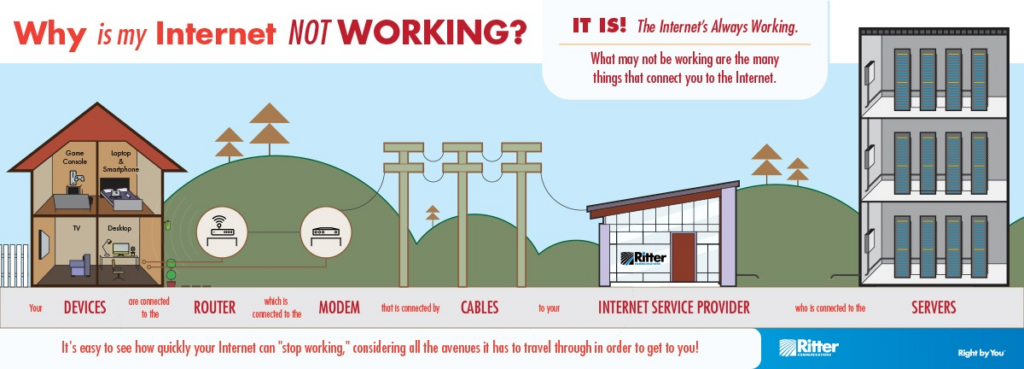
And trust me, those will also be required considering the complicated route the internet takes to reach you:
Look for Hidden Network Activity
Your internet may be working harder than you realise.
Automatic software updates, cloud backups, online gaming, streaming services, or extensive downloads running in the background can consume significant bandwidth without attracting much attention.
If your connection only feels slow at certain times, another device may be using more of your available bandwidth than expected.
Run a Speed Test
A speed test provides a useful snapshot of your connection.
Try testing at diverse times throughout the day rather than relying on a single result. If speeds remain consistently lower than expected, it may indicate an issue with your service. If performance varies dramatically, network congestion or household usage could be contributing to the problem.
Testing regularly gives you useful information if you need to contact your provider later.
Know When It’s Time to Ask for Help
Once you’ve ruled out common household issues, it’s reasonable to contact your provider.
Describe the troubleshooting steps you’ve already completed, including testing multiple devices, restarting your equipment, and checking your speeds. Providing this information can help support staff identify potential problems much more quickly.
Repeating basic troubleshooting steps you’ve already completed is no use if, let’s say, there’s a problem with internet exchange points.
A Little Troubleshooting Can Save a Lot of Frustration
Internet troubles aren’t always caused by the connection coming into your home. In many cases, the real issue lies with WiFi coverage, connected devices, background activity, or ageing equipment.
By taking a few minutes to toil through the basics, you’ll have a much clearer understanding of where the problem actually sits. Whether the solution is as simple as moving your router or as involved as speaking with your provider, you’ll be making decisions based on evidence rather than guesswork—and that’s usually the fastest path back to a reliable connection.
FAQs
Ans: First, do a speed test, then test it on a different device, and maybe try moving closer to the router to see whether there’s any change.
Ans: Many. Slow speeds, unknown devices on the network list, browser redirecting to strange websites, etc.
Ans: In that case, the problems can be high latency/ping, packet loss, or local interference.