Roblox IP Ban: Why It Happens and How to Regain Access
When you open the Roblox website on your computer and see the loading page for half an hour, you know that it can be a ban because there are no network issues. Outrages, account restrictions, and app errors can cause these bans. The message on your screen and the features you can still access are also important to know the exact cause.
This article explains how IP restrictions differ from account penalties and bans from individual games. The listed checks can help you to identify where access fails and chooses reasons for Roblox bans, account security advice, and all the queries that are coming to the surface level of your mind.
What Is a Roblox IP Ban?
A Roblox IP ban blocks access from a particular public IP address. Roblox sees this address when your device connects. Your phone and computer may share the same IP on your home Wi-Fi. A restriction could affect both devices. But an account ban pops up on your Roblox account, not your network. Check IP bans and account bans separately.
Switching networks or using a proxy can switch the public IP Roblox sees. For example, rotating residential proxies route your requests through residential connections, providing another source IP. Rotation settings let you select when the proxy uses a different IP. Account penalties remain attached to the account, so any appeal still follows the instructions in your moderation notice.
Roblox IP Ban vs Other Access Problems
If you want to know if your IP is banned on Roblox, the error notification is only one clue. Account restrictions, game bans, and technical faults can look similar. The table compares the messages and access patterns that help differentiate them.
| Problem Type | What It Usually Affects | Most Useful Clue |
| Account restriction | Access through the affected account | A moderation notice explaining the account action |
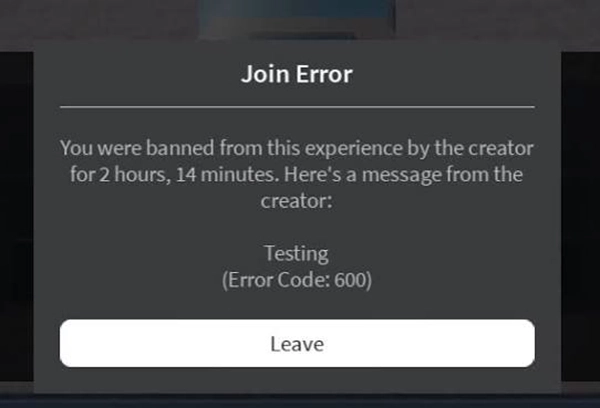
| Game ban (experience ban) | Access to a particular game | Error 600 while other games remain available |
| Client or connection error | A device, application, or connection | Error 403, initialization problems, or connection messages |
| Network-related access problem | Access through a particular network | Similar failures across devices using the same connection |
The table provides you with a starting point. To check whether your IP is banned from Roblox, start with the full message and current service status. Then compare access across games, devices, and networks from the steps below.
1.Read the Complete Roblox Message
A ban message may state a reason, an end date, and a review link. Save the full wording, code, and approximate time. Those details guide an appeal or tell you when access may return. Loading failures and timeouts require service and network checks.
2. Check Roblox Status and Your Internet Connection
Roblox Status lists known incidents impacting the website, app, and games. You can follow recovery updates there during an outage. If other websites and apps also fail, check your local connection. On school or workplace Wi-Fi, an administrator can ensure whether access rules are blocking Roblox.
3. Check Which Accounts and Games Are Affected
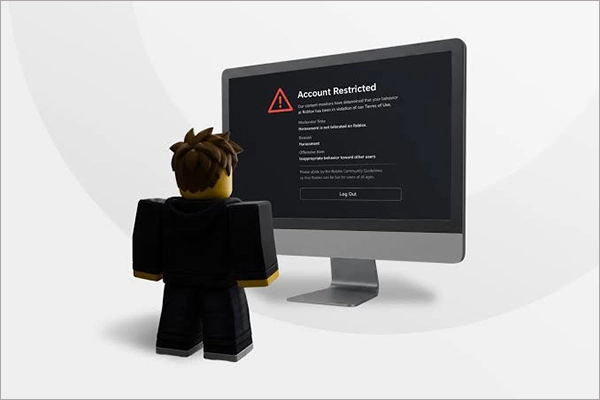
Using your existing account, compare the Roblox webpage, the affected game, and other games. If only one game fails, look for a ban notice. A moderation notice that appears for the same account on different devices points to an account restriction. Document which features remain available.
4. Compare Devices and Networks
Repeat the same Roblox action on your general network and another network, keeping the account and device unchanged. Then compare two devices on your usual network with the same account. Each comparison changes one condition, helping you verify whether the issue follows the network or the device. Record the full message and outcome of each test.
What to Do If Roblox Access Is Blocked
If Roblox works on a different network, focus on the original connection. When the website loads but the app will not launch, check its installation and device settings. Roblox handles account appeals. For a ban limited to one game, reach the creator through their Roblox profile.
Network Changes and Proxy Connections
You can retry the failed Roblox action on various networks, or try a residential proxy for a different public IP. IPcook offers residential proxies with rotating and sticky sessions, so you can switch IPs or reuse one for testing. Verify that the affected browser or app uses the proxy. Keep your account and device unchanged, and record the results. Proxies may help bypass a Roblox IP ban, but cannot promise access or lift account penalties.
Fix App and Connection Problems
If the Roblox app fails to launch, look for updates and follow the official reinstallation instructions. For website errors, clearing your browser cache or temporarily disabling your extensions may help. If the issue continues, send Roblox Support the complete error message, your device and operating system details, steps to reproduce it, and the checks you have already done.
Appeal an Account Ban
Your moderation notice sends you to Violations & Appeals or the Roblox Support Form. Only the account owner can appeal using an email linked to the account. Include the username and a short reason for review. Appeals are usually due within 30 days, or six months for EU users. Roblox does not review duplicate appeals for the same penalty.
Common Reasons for Roblox Bans
Roblox may send warnings, remove content, or restrict accounts after a rule violation. The response depends on the severity of behavior, its impact on others, and previous violations. Game creators can also ban players for breaking regulations within their own games.
Cheating and Exploits
Cheat scripts and exploit tools provide players an unfair advantage and violate Roblox’s rules. Some downloads also contain malware that steals passwords or other login details.
Harassment and Harmful Content
Roblox’s Community Standards apply to chat and shared content. Harassing players, making threats, or posting discriminatory or other harmful material may lead to account restrictions.
Phishing and Scams
Scammers use fake login pages or fraudulent Robux gifts to steal passwords. These schemes violate Roblox’s rules and can spread through stolen accounts.
Spam and Repeated Violations
Sending spam or using bots to disrupt Roblox can bring penalties. Repeating the behavior after a warning may result in stricter restrictions on the account. Using silent authentication can prevent such mishaps.
A scammer may use a stolen account to spam, scam, or cheat before its owner discovers the penalty. If you suspect this happened, compare the violation date with unfamiliar logins or unexpected password and recovery email changes. Know that timeline in your appeal to explain why you believe someone else had access during the reported violation.
How to Avoid an IP Ban on Roblox
Using official software and protecting your login credentials can reduce account misuse. On shared computers, signing out after playing also helps prevent others from using your account.
Use the Official Roblox App
Download the official Roblox app and keep it updated. Checking the download source can avoid modified clients, cheat tools, or unfamiliar extensions that could interfere with games or steal login details. Following both Roblox’s platform rules and each game’s regulations can reduce the risk of penalties.
Protect Your Roblox Account
A unique password and two-step verification can prevent unauthorized access. Keep your recovery email current and verification codes private with decentralized identity. If you notice unfamiliar activity, change your password and review active sessions in Security settings. You can log out of suspicious sessions there and contact Roblox Support for help.
Use Shared Wi-Fi and Devices Carefully
Signing out of Roblox after playing on a shared computer helps prevent anyone else from using your account. Shared Wi-Fi may also put several players behind one public IP. On school or workplace networks, an administrator can explain the access regulations before you change connection settings.
FAQs About IP Bans in Roblox
Ans: Roblox’s published moderation guidance does not list an official duration for an IP ban. Check your notice for an end date and the specific restriction it applies to. If the timeframe is unclear, send Roblox Support the complete error message and the time the issue began so they can investigate.
Ans: Not essentially. Restarting a router reconnects it to your internet service provider. Whether the public IP address changes depends on the provider’s allocation method. Dynamic IPs may stay the same, while static IPs rarely remain unchanged. A restart can help with connection problems, but changing the IP does not remove account penalties.
Ans: No. A device ban targets a particular device, while an IP ban targets a network address. If only one computer cannot connect, its app, operating system, or security software may be accountable. The error message and results from devices on the same network help narrow down where the issue occurs.
Final Thoughts
For a suspected Roblox IP ban, check the whole message and which accounts, games, devices, or networks are affected. Roblox handles account appeals, and game creators handle appeals for bans they have imposed. App and network failures need technical troubleshooting. Saved notices and test results show support teams what failed and what you have already noted.
If your tests call for another IP, IPcook provides residential proxies with setup guides for compatible browsers and apps. The affected browser or app needs to use the proxy. Comparing the same failed action across connections helps you decide whether the proxy is suitable for your task.