Best Free SQL Formatter Tools for SQL Server
SQL query formatters are fixing whitespace and capitalization now. These tools help in arranging chaotic queries, saving developers from endless formatting grunt work. However, not every SQL Server code formatter delivers the same level of accuracy, flexibility, or support for complex SQL Server syntax. This blog will explore six of the best free SQL formatters for SQL Server, so you can find the one that fits your workflow.
The blog mostly considers features like support for SQL Server, formatting precision, customization, ease of use, and workflow integrations.
List of the Best Free SQL Query Formatter Tools
Here are six free SQL query formatter tools for you to consider. Some work directly from the browser, others plug into editors or operate from the command line. It depends on your workflow, the SQL dialect you use, and how much control you want over the formatting rules.
1. Devart SQL Beautifier & Formatter Online

This is an online tool for formatting and cleaning SQL code. It offers users the SQL formatting capabilities of dbForge SQL Complete and dbForge Studio for SQL Server, so they can easily improve the readability of their queries without installing extra software.
To use it, simply paste your SQL code into the editor, pick one of the available formatting profiles, and click Format. It is free and runs right in the browser, so it is convenient for easy formatting when you don’t want to bring up a full SQL development environment.
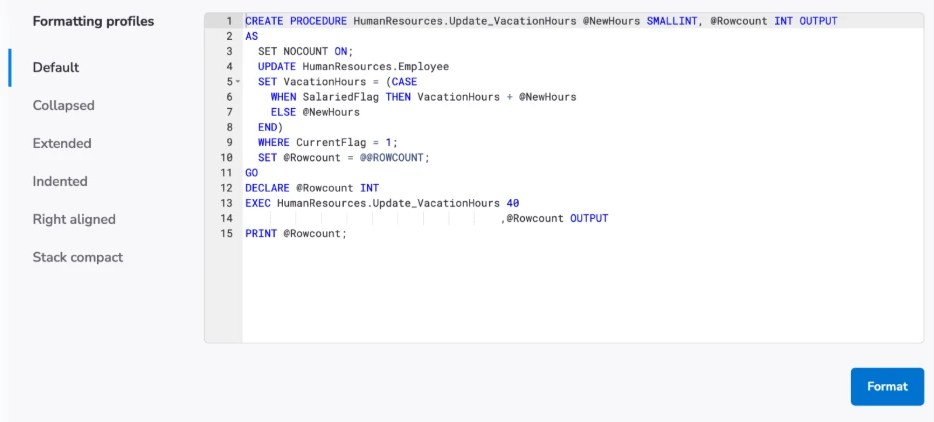
Alt text: Devart SQL Formatter Online interface showing predefined formatting profiles and formatted T-SQL code in the browser.
Features
- SQL formatter and beautifier for the browser.
- There are predefined profiles: Default, Collapsed, Extended, Indented, Right Aligned, and Stack Compact.
- It quickly formats the pasted SQL code.
- Users can preview multiple formatting styles.
- No installation or registration required.
Pros
- It works right in the browser; no install needed.
- Formats SQL code in a couple of clicks.
- Includes a handful of pre-defined formatting profiles.
- Use to easily clean up queries before sharing or reviewing.
- Free to use.
Cons
- The online version has less functionality compared to dbForge SQL Complete.
- Advanced formatting settings are not present in the browser tool.
- Cannot create custom formatting profiles online.
- No support for bulk formatting files or folders.
Compatibility
| Category | Details |
| Deployment | Browser-based (online) |
| Primary use | SQL formatting and beautification |
| Platform | Any OS with a modern browser |
| Formatting profiles | Default, Collapsed, Extended, Indented, Right Aligned, Stack Compact |
| Cost | Free |
| Vendor | Devart (devart.com) |
2. Poor SQL Formatter

PoorSQL is a free, open-source formatter created around the Poor Man’s T-SQL Formatter library. It is designed specifically for T-SQL and runs completely in the browser, allowing users to format SQL code without sending queries to an external service.
Beyond the web version, the formatter is also available through integrations for SSMS, Visual Studio, Notepad++, WinMerge, and command-line workflows. It aids complete SQL batches, stored procedures, triggers, and other SQL Server scripting scenarios.
Alt text: PoorSQL formatter showing formatted T-SQL output with configurable formatting options in the browser.
Features
- T-SQL-specific formatting for SQL Server.
- Client-side browser processing with offline support.
- Formatting for stored procedures, triggers, and multi-batch scripts.
- Optional SQL minification.
- SSMS, Visual Studio, Notepad++, WinMerge, and command-line integrations.
- HTML output with syntax coloring.
Pros
- SQL formatting runs locally in the browser.
- Works offline after the initial load.
- Open-source and free to use.
- Available for SSMS, Visual Studio, Notepad++, WinMerge, and command-line workflows.
- Supports stored procedures, triggers, and multi-batch SQL scripts.
Cons
- Supports T-SQL only.
- Offers fewer formatting controls than some commercial tools.
- DDL parsing is limited compared to full SQL parsers.
- Interface feels dated compared to newer web-based tools.
Compatibility
| Category | Details |
| Deployment | Browser-based (online) + SSMS/Visual Studio + Notepad++ + WinMerge + CLI |
| Primary dialect | T-SQL (SQL Server) |
| Platform | Windows (plugins); any modern browser (online) |
| License | AGPL (open source) |
| Cost | Free |
3. Instant SQL Formatter

Instant SQL Formatter is a free browser-based formatter from Gudu Software. It supports several database platforms, including SQL Server (T-SQL), Oracle, MySQL, IBM DB2, and MS Access, making it helpful for developers working across different SQL dialects.
Users can choose a database dialect before formatting and generate output in plain text, HTML, or RTF formats. The same formatting technology is also available through Gudu’s desktop tools and add-ins for Visual Studio and SQL Server Management Studio.
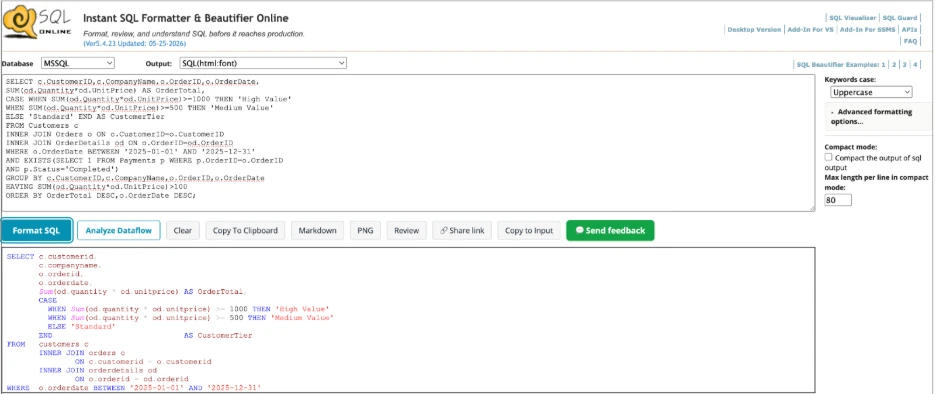
Alt text: Instant SQL Formatter showing formatted T-SQL query with joins, subquery, CASE expression, and aggregation after dialect-aware formatting.
Features
- Dialect selection for SQL Server, Oracle, MySQL, DB2, and MS Access.
- SQL formatting and beautification in the browser.
- Keyword capitalization controls.
- Indentation and layout options.
- Plain text, HTML, and RTF output formats.
- Desktop version and add-ins for Visual Studio and SSMS.
Pros
- Supports various SQL dialects from a single tool.
- Lets users select the target database before formatting.
- Creates plain text, HTML, and RTF output.
- Available as both an online formatter and desktop solution.
- Free to use online.
Cons
- Interface seems dated compared to newer web-based digital tools.
- Advanced formatting options are only available in the desktop version.
- No built-in CI/CD integration.
- The browser version is primarily designed for manual formatting tasks.
Compatibility
| Category | Details |
| Deployment | Browser-based (online) + desktop + SSMS add-in + Visual Studio add-in |
| Dialects supported | T-SQL, Oracle/PLSQL, MySQL, DB2, MS Access |
| Platform | Windows (desktop/add-ins); any modern browser (online) |
| Vendor | Gudu Software (dpriver.com) |
| Cost | Free (online); desktop version available separately |
4. SQL Pretty Printer

SQL Pretty Printer is Gudu Software’s desktop SQL formatter and SSMS add-in. Unlike the company’s online formatter, it provides more than 80 formatting options covering indentation, keyword casing, alignment, comma placement, and other SQL styling preferences. Users can save formatting layouts and reuse them across projects, making it a good option for teams that want consistent SQL formatting standards.
The tool is available as a desktop application and integrates with SQL Server Management Studio and Visual Studio. It also includes SQL-to-code conversion features that can transform SQL statements into formats suitable for C#, VB, Java, PHP, Delphi, and other programming languages.
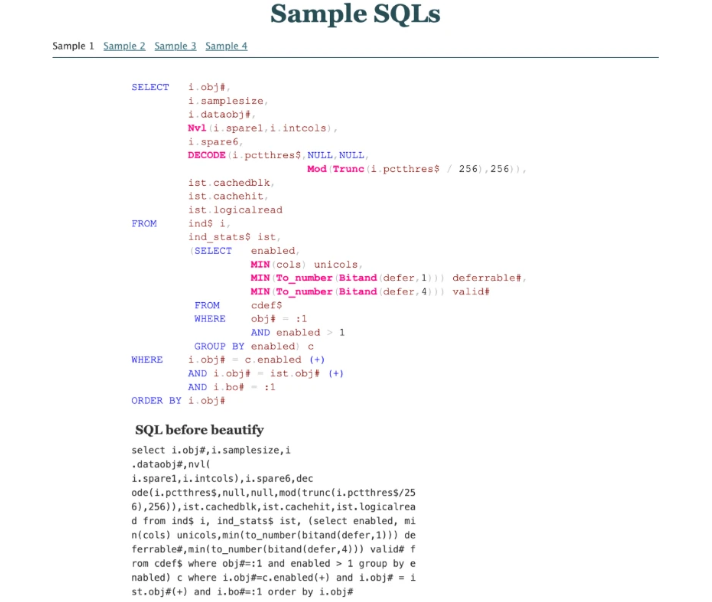
Alt text: SQL Pretty Printer showing formatted SQL output alongside the original unformatted query.
Pros
- Covers more than 80 formatting options.
- Lets users save and reuse formatting layouts.
- Available as a desktop application and SSMS add-in too.
- Supports SQL-to-code conversion for various programming languages.
- Includes batch formatting capabilities.
Cons
- Available only on Windows.
- Needs a paid license after the trial period.
- Interface feels dated compared to modern development tools.
- Large number of settings may be unwanted for simple formatting tasks.
Features
- More than 80 configurable SQL formatting options.
- Save and reuse formatting layouts.
- SSMS and Visual Studio integration.
- Batch formatting support.
- SQL conversion for C#, VB, Java, PHP, Delphi, and other languages.
- HTML and RTF output generation.
- Support for SQL Server, Oracle, MySQL, DB2, and MS Access.
Compatibility
| Category | Details |
| Deployment | Desktop application + SSMS add-in + Visual Studio add-in |
| Dialects supported | SQL Server (T-SQL), Oracle, MySQL, DB2, MS Access |
| Platform | Windows |
| Vendor | Gudu Software (dpriver.com) |
| Cost | Free trial; license required for continued use |
5. SQLFormat.org

SQLFormat.org is a browser-based SQL formatter sourced by the open-source sqlparse library. SQL statements are processed directly in the browser using Pyodide, meaning queries are formatted locally without being sent to an external server.
The tool focuses on quick formatting and readability improvements while offering a handful of useful controls, including keyword casing, identifier casing, indentation settings, comment removal, and compact formatting options. No installation, registration, or account is needed.
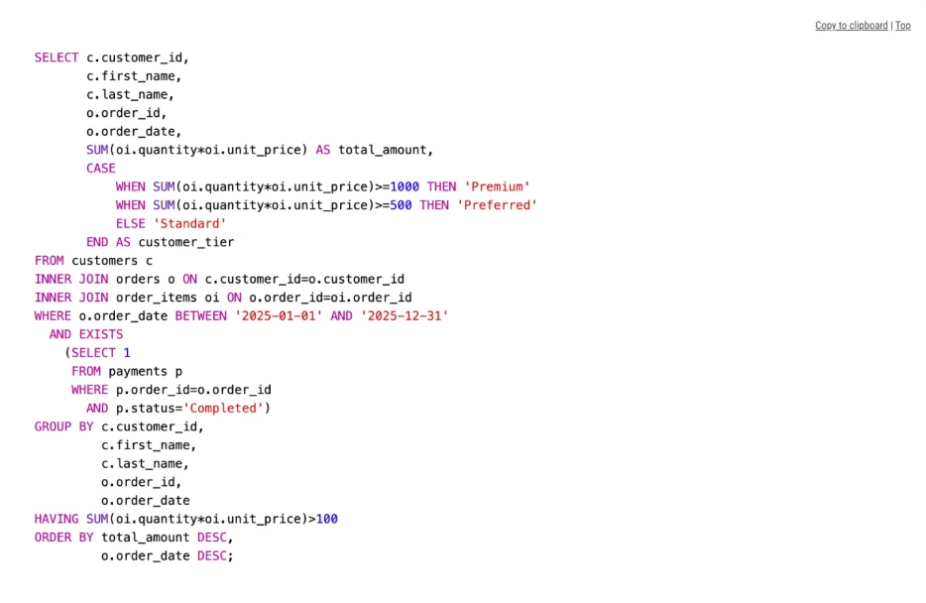
Alt text: SQLFormat.org displaying a formatted SQL query with joins, subquery, CASE expression, and aggregation in the browser.
Features
- Browser-based SQL formatting.
- Local processing using Pyodide and sqlparse.
- Keyword casing controls.
- Identifier casing controls.
- Adjustable indentation settings.
- Comment removal and compact formatting modes.
- No registration or usage limits.
Pros
- Processes SQL locally in the browser.
- No account or installation required.
- Built on the open-source sqlparse library.
- Includes formatting controls for keywords, identifiers, and indentation.
- Free online SQL formatter.
Cons
- Fewer formatting options than dedicated desktop tools.
- No custom formatting profiles.
- No IDE or editor integrations.
- Designed primarily for browser-based formatting workflows.
Compatibility
| Category | Details |
| Deployment | Browser-based (online) |
| Platform | Any modern browser |
| Technology | Latest version of sqlparse via Pyodide |
| Processing | Local browser processing |
| Cost | Free |
6. SQLFluff

SQLFluff is an open-source SQL linter and formatter made for teams that manage SQL in source control. Unlike browser-based formatters, it runs from the command line and fits perfectly into automated development workflows such as pre-commit hooks and CI/CD pipelines.
The tool can lint, fix, parse, and validate SQL across various dialects while allowing teams to define their own formatting standards through configuration files. SQLFluff also supports Jinja templating and dbt projects, making it famous in analytics and data engineering workflows.
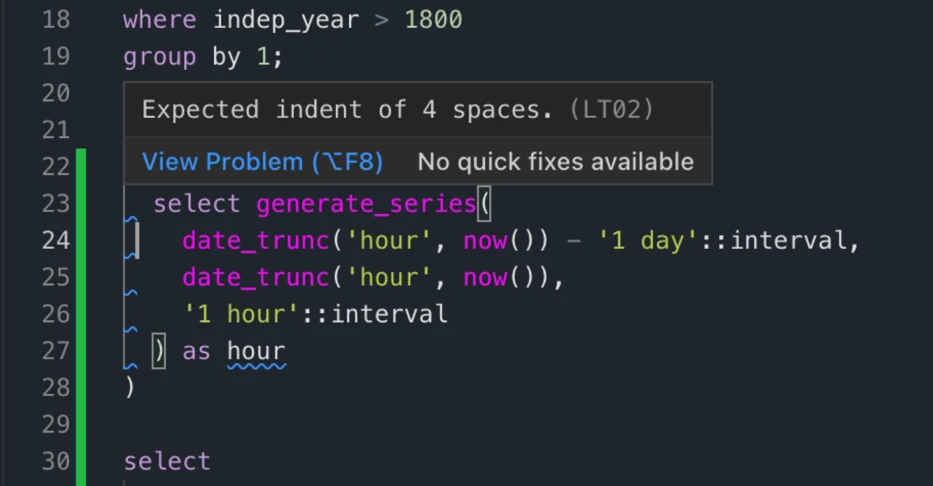
Alt text: SQLFluff linting a SQL query and reporting an LT02 indentation violation in VS Code.
Pros
- Helps enforce consistent SQL formatting across teams.
- Supports multiple SQL dialects.
- Automatically fixes many formatting issues.
- Works with Jinja templates and dbt projects.
- Integrates with automated development workflows.
Cons
- Requires Python installation.
- Command-line interface may be challenging for beginners.
- No graphical user interface.
- Configuration may need some initial setup.
Features
- SQL linting with sqlfluff lint.
- Automatic formatting with sqlfluff fix.
- SQL parsing and syntax validation.
- Configurable formatting rules and style settings.
- Support for multiple SQL dialects.
- Jinja and dbt project support.
- Installation through pip and other Python package managers.
Compatibility
| Category | Details |
| Deployment | CLI (Python package) |
| SQL support | Multiple SQL dialects including T-SQL, PostgreSQL, MySQL, Snowflake, BigQuery, and Spark |
| Platform | Windows, macOS, Linux |
| Workflow integration | Pre-commit hooks, CI/CD pipelines, automated code review workflows |
| License | Open source |
| Cost | Free |
SQL Formatter Tools Comparison Table
Use the table below to shortlist tools by deployment type, SQL Server dialect support, configuration depth, and cost. The best SQL formatter for a given team depends on whether the requirement is browser-based instant formatting, SSMS integration, or free SQL formatter pipeline automation.
| Tool | Type | SQL Server support | Online / desktop | Custom formatting rules | Best for |
| Devart SQL Formatter Online | Online Formatter | Yes (T-SQL) | Online | Predefined Profiles | Quick SQL formatting |
| PoorSQL | Online Formatter + Plugins | Yes (T-SQL) | Online + Desktop Integrations | Limited | T-SQL scripts and offline formatting |
| Instant SQL Formatter | Online Formatter | Yes (T-SQL) + Other Dialects | Online | Moderate | Multi-dialect query formatting |
| SQL Pretty Printer | Desktop Formatter + SSMS Add-in | Yes (T-SQL) + Other Dialects | Desktop | Advanced (80+ Options) | Team formatting standards and complex SQL |
| SQLFormat.org | Online Formatter | Generic SQL | Online | Basic | Fast browser-based formatting |
| SQLFluff | CLI Linter & Formatter | Yes (T-SQL) | Desktop / CLI | Advanced (Configurable Rules) | CI/CD pipelines and team workflows |
How to Choose The Best SQL Formatter Tool
The right SQL formatting tool is determined by where the formatting requirement arises in the workflow and how much control is required over the output. There is no universally right answer, but three practical splits cover most real-world cases.
Choose a Free Online SQL Formatter Tool for Quick Formatting
An online SQL formatter needs no installation and no configuration. Paste a query, click format, copy the result. This is the right choice for ad-hoc tasks: cleaning up a query before sharing it in a ticket, standardising code copied from a tracking tool, or formatting a script before submitting it for code review. Browser-based SQL code formatter online tools cover this use case with minimal friction.
Use IDE or CLI Tools for Development Workflows
For developers and DBAs writing SQL in SSMS or Visual Studio daily, a SQL code formatter that integrates into the editor removes the step of copy-pasting into a browser tool. PoorSQL’s SSMS plugin, SQL Pretty Printer’s SSMS add-in, and the full dbForge SQL Complete product all format directly in the SQL editor with a single keystroke.
Consider SQL Dialect Compatibility
Most tools in this comparison are made primarily for SQL Server T-SQL. Teams that also work with PostgreSQL, MySQL, or Oracle should verify that their chosen tool manages each dialect correctly. Using a T-SQL-optimised formatter on PostgreSQL-specific syntax produces incorrect output.
| Your situation | Best fit |
| SQL Server T-SQL, browser, no install | Devart SQL Formatter Online |
| SQL Server T-SQL, SSMS integration | PoorSQL SSMS plugin or SQL Pretty Printer add-in |
| Multi-dialect (T-SQL + MySQL + Oracle) | Instant SQL Formatter or SQLFluff |
| CI/CD pipeline, version-controlled SQL | SQLFluff |
| Quick clean-up, privacy-first, no config | SQLFormat.org or PoorSQL (client-side) |
| Team style standard, SSMS, Windows | SQL Pretty Printer (80+ rules, shareable templates) |
Takeaway: Which Free SQL Formatter Should You Use?
For SQL Server developers, Devart SQL Formatter Online is the easiest place to begin. It is built specifically for T-SQL and handles common SQL Server constructs such as CTEs, subqueries, CASE expressions, and window functions without requiring installation or setup.
If you work mainly in SSMS, PoorSQL and SQL Pretty Printer bring formatting directly into the editor. For teams enforcing SQL standards through version control and CI/CD pipelines, SQLFluff is the solid choice. If you regularly work across multiple database platforms, Instant SQL Formatter supports the widest range of SQL dialects.
Ultimately, the best SQL formatter is the one that fits automatically into your workflow—whether that’s a browser, an editor, or an automated development pipeline.
Frequently Asked Questions
Ans: A SQL formatter automatically reorganises SQL code into a consistent layout. It adjusts indentation, line breaks, keyword casing, and spacing to make queries easier to read, review, and maintain.
Ans: It depends on how you work. The Devart SQL Formatter Online free tool is a strong option for quick browser-based formatting, PoorSQL works well for SQL Server users who want offline and SSMS integration, and SQLFluff is a good fit for teams enforcing formatting standards through CI/CD pipelines.
Ans: Yes. Tools such as Devart SQL Formatter Online, PoorSQL, Instant SQL Formatter, and SQLFormat.org all work directly in the browser without requiring installation. Some, including PoorSQL and SQLFormat.org, process queries locally in the browser rather than sending them to a server.
Ans: Well-formatted SQL is easier to read, debug, and review. Consistent formatting with a SQL query formatter online tool helps teams follow the same coding style, reduces distractions during code reviews, and makes complex queries easier to understand over time.