Free Word Download: The Definitive 2026 Guide to Accessing Microsoft Word
Do you remember the time when Microsoft Office, or Word in particular, was not so popular? Me neither.
It comes with newer iterations in newer packages every now and then and becomes as popular as before. The latest Office software suite, Microsoft 365 Copilot, has been adopted by over 90% of the Fortune 500 companies.
But let’s accept it, not everyone can afford to buy the suite. The majority of us used to search Google for “Free MS Word Download” to find an unpaid version. It also meant going to the seas, pirating.
But in 2026, many legal ways have opened to get the software without paying anything. And you don’t always need to borrow your niece’s student ID card to get that. You can get the free software as a professional or even for casual personal use. Microsoft itself offers web-based and mobile solutions. Nevertheless, besides that, there are open-source alternatives to Word as well.
In this article, I’ll list some official methods to get your hands on the proprietary software without paying anything. But first, you should be aware of the system requirements of the software in 2026. In case you don’t pass the criteria, even for that, consider reading the list of alternatives. Also, avoid the sources that promise you a Word-like experience for free.
KEY TAKEAWAYS
- You can get MS Office for free legally via the Microsoft 365 Web version, the mobile app, or through the education program for students and teachers.
- For offline desktop use without a subscription, open-source suites such as LibreOffice or WPS Office are the top-rated options.
- Match the software system requirements with your setup before downloading.
- Avoid the “cracks” and “activators,” which can be viruses and malware.
Official Methods to Get Microsoft Word for Free
Just as the trend is, MS Office has also shifted to a SaaS model. While the full desktop suite usually requires a subscription, the unpaid version still rewards you with several robust features.
A. 365 for the Web (Formerly Office Online)
This is the most popular way to use Office without paying anything. It requires no installation and works on any browser (Edge, Chrome, Safari).
- How to access: Sign in on Office.com. The Microsoft account is absolutely free.
- Best for: Real-time collaboration, moderate-level document formatting, and cross-device access.
- Limitations: Requires an internet connection and lacks advanced features such as Mail Merge and complex Macro support.
B. Word Mobile App
People who have tablets and smartphones (10.1 inches or less screen devices) get an unpaid version of Office from Microsoft.
- Platform: Available on the Google Play Store and Apple App Store.
- Key Feature: The “Reflow” view makes reading and editing documents on small screens significantly easier.
C. 365 Education (For Students & Teachers)
If you have a valid school email address (.edu), you may be eligible for the Microsoft 365 A1 or A3 plan.
- What’s included: Often includes the full “Free Word Download” for desktop, plus Excel, PowerPoint, and 1 TB of OneDrive storage.
- Check Eligibility: Visit the Microsoft Education page and enter your institutional email.
Top Free Alternatives to Microsoft Word (Desktop Download)
If you need everything that comes with Word Download—word-processing, unpaid, offline, and docx file support—then the only option is MS Office alternatives. In 2026, there are many good options that are freely available.
| Software | Best For | Offline Use | AI Integration |
| LibreOffice | Power Users & Privacy | Yes | Plugin-based |
| WPS Office | UI similarity to Word | Yes | Built-in AI |
| Google Docs | Collaboration | Optional | Gemini Integration |
| FreeOffice | Lightweight PC use | Yes | No |
LibreOffice: The Open-Source Powerhouse
Successor to OpenOffice, LibreOffice is the gold standard for open-source productivity. It offers:
- Format Support: Seamlessly opens and saves in Word formats (.doc, .docx).
- Advantage: No ads, no tracking, and it includes advanced features like a math formula editor and vector drawing.
WPS Office: The Modern Alternative
If you want an experience similar to Microsoft 365 but your pockets are empty, WPS Office is the way to go. It features a tabbed interface that lets you open Word, PDF, and Excel download files in a single window.
Technical Requirements for Word 2026
You download the software, but it lags while running or, worse, refuses to start or even install. Every bit of effort goes down the drain. That’s why it’s better to first check the system requirements.
- Operating System: Windows 10/11 (Version 22H2 or later) or macOS 13 (Ventura) or later.
- Processor: 1.6 GHz or faster, 2-core (ARM-based processors like Apple M-Series are fully supported).
- Memory: Minimum 4GB RAM (8GB recommended for AI-assisted features).
- Storage: 4GB available disk space for the full desktop installation.
Avoiding Malware and “Cracked” Software
Search “Microsoft Office Download,” and the results page will be filled with words like “cracked” and “activator,” etc. Don’t even dare to click on any of those.
Warning: In 2026, these are the leading causes of ransomware and credential theft.
Why “Cracked” Word Is Dangerous
The neat infographic summarizes all the reasons to avoid cracked MS Office suites:
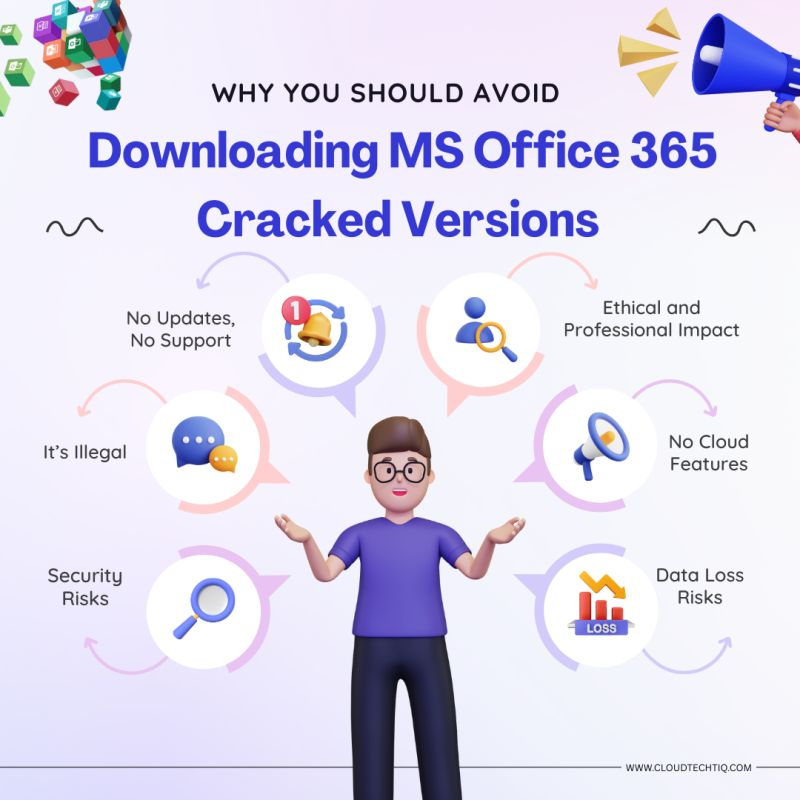
Alt: Reasons to Avoid Cracked MS Office
Generative AI in Word: What’s Free?
This is the AI era, so it’s plain foolish to imagine anything without it, not even our good old MS Office. Using the web version of Word, you get access to:
- Editor: Edit documents as much as you want. AI handles grammar and spell-check.
- Copilot (Limited): Free users can do basic AI drafting, which can then be exported directly into a document.
Expert Tips for Document Management
Many people continue to use Word software as they did in the 90s or 00s. But you can use it better only if you know some expert-level tips:
- Sharing in PDF: Always “Export to PDF” before sending documents to anyone, especially if you use free alternatives like LibreOffice. This ensures that formatting stays exactly as intended.
- OneDrive Sync: Even if you use the free web version, keep your files in OneDrive. It provides version history, so you can recover a document if you make a mistake.
- Template Libraries: Both WPS Office and 365 Web offer thousands of templates. Don’t start from scratch; use a template to save time.
Strategic Conclusion
Now, you don’t have to explore the treacherous seas searching for MS Word and get your PC bricked. This guide has given you enough knowledge to acquire the tool through legal means, and that too for free.
Enjoy playing with the words, worry-FREE!
Ans: Yes, 365 for the Web is 100% free. It allows you to create, edit, and share Word documents in your browser.
Ans: You can download the Microsoft 365 App for free from the Microsoft Store, which provides you with access to the web versions of Word. To get the “offline” desktop app, you must be a student or use a 30-day trial.
Ans: LibreOffice is the best for offline power users, while Google Docs remains the best for simple, cloud-based collaboration.






© 2026 allinsider.net All rights reserved