PDF QR Code Generator: A Smarter Way to Share Documents Instantly

PDF QR code generators have drastically changed how documents used to be shared a decade ago. Instead of printing whole documents or sharing them manually, users can use a QR code to share documents in seconds—without lengthy steps or manual file transfers.
As a result, more than 11 million QR codes are scanned globally every day—showing its rapid growth and adoption. (Source – Worldmetrics)
What are you waiting for? Go through this post to learn how this smart technology works and create a QR code for your PDF to take advantage of this cutting-edge technology.
Key takeaways
- A PDF QR code generator allows one to share documents instantly with a scan.
- It removes the need to print documents manually or share entire files.
- Features like dynamic QR codes make it more flexible and safe to share.
How a PDF QR Code Generator Works
A PDF QR code generator is basically a tool that converts a PDF file into a QR code. This QR code is scannable and holds the link that directs to the document.
At its core, the process starts with the upload of the PDF file. The tool stores the file’s information and provides a unique URL pointing to that information. After the conversion into a QR code, whenever scanned, it will direct users to that same URL, showing the same information as the PDF.
Hence, the PDF QR code generator reduces the need for opening a document manually and helps businesses to simply print a single QR code instead of writing large documents.
Why Instant Document Sharing Matters in a Mobile-First World
In today’s mobile-first world, almost every other user accesses information through their smartphones. According to research by the Pew Research Center, most of the users rely on mobile devices to access online content.
Modern organizations and businesses expect their documents to be shared within seconds without the need to download them fully. And this convenience is more about saving time than reducing data usage.
The PDF QR code generator makes instant sharing of documents possible. With just a quick scan, users can get access to a document just like a normal PDF.
This approach to removing unnecessary steps and making the process smoother by integrating modern features has made it a popular choice in a mobile-first world.
Interesting Fact
A QR code scan takes less than a second, yet it opens a document that may have hundreds of pages.
Key Features to Look for Before Choosing a Tool
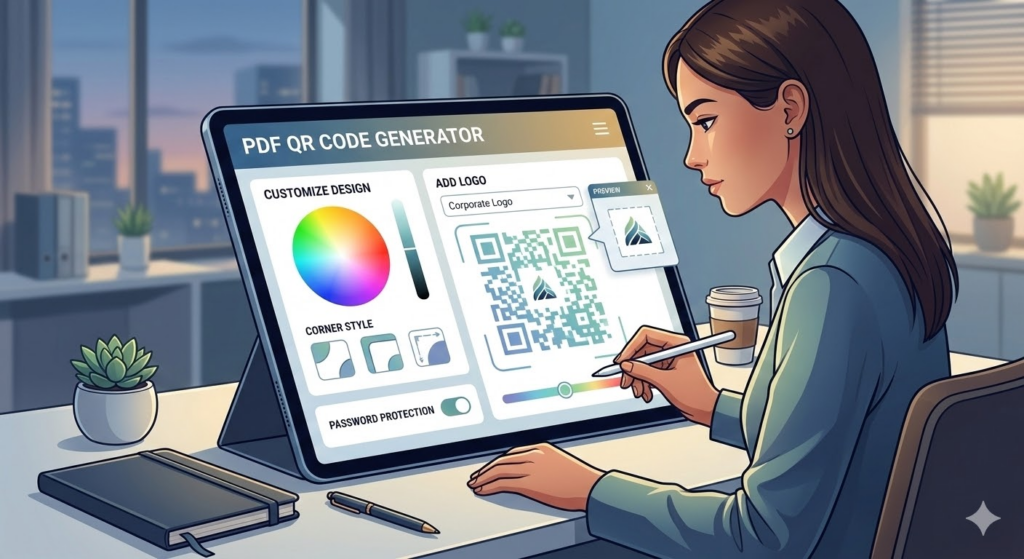
With a wide range of PDF QR code generators, selecting the right one is key for smooth and secure document sharing. Look for the below-mentioned features with their importance:
| Feature | Why It Matters |
| Convenience to Use | The tool needs to have a simple interface so that one can convert the documents and generate QR codes in less time. |
| Dynamic QR Code Features | It allows the person to update and make changes in the document without changing the QR code itself. |
| File Security | A perfect tool will help to protect the uploaded documents using protections like passwords and secure hosting. |
| Customization Option | With this feature to add colors, logos and make changes in the code, one can make the QR code more appealing and engaging. |
Security and Access Control: What You Should Know
While sharing a document through the internet, considering security is crucial. With such convenient sharing through a QR code, the chances of reaching the wrong person increase.
To outperform the potential risks, features like password protection can help to ensure only authorized persons will be able to open it. Moreover, some tools also allow users to set an expiry date for the document link.
In short, managing access controls and using the right features is essential to keep it protected while enjoying the easy sharing.
Best Practices for Using a PDF QR Code Generator Effectively
Following the best practices when using a PDF QR code generator ensures safer and more efficient document sharing. Explore the below-mentioned practices for effective use –
- Ensure the document is mobile-friendly so that most people can access it without struggles.
- Make sure the QR code directly sends the user to the document, as its main purpose is convenience.
- Always add a brief message near the QR code explaining what users will get after scanning.
- Update the document information with time so that it’s useful and relevant always.
Also, learn how one can elevate their digital marketing strategy by integrating a QR code into their business.
Conclusion
In conclusion, the PDF QR code generator makes document sharing much easier, faster, and more convenient. Instead of sending the complete file, a QR code can provide instant and smart access to the document.
As mobile use grows with time, this modern approach allows individuals to share information faster, reduce paperwork, and make sharing access easier.
Ans: No, most of the modern smartphones come along with the technology to scan the QR codes through the camera.
Ans: Yes, but this feature is only available in the dynamic QR code. Documents can be updated.
Ans: By using features like password protection and safe hosting, security can be enhanced effectively.