Stop Wasting Time! This AI 3D Printing Tool Fixed My Slicing and Coloring Nightmares
3D printing is an incredible experience, but it is full of challenges. Fixing a messy mesh, working on geometries, and adjusting models because of print failures due to incorrect support settings take up a lot of time. In multi-color printing, the preparation of colors and the process of coloring itself usually take quite a bit of time and need to be done in other programs.
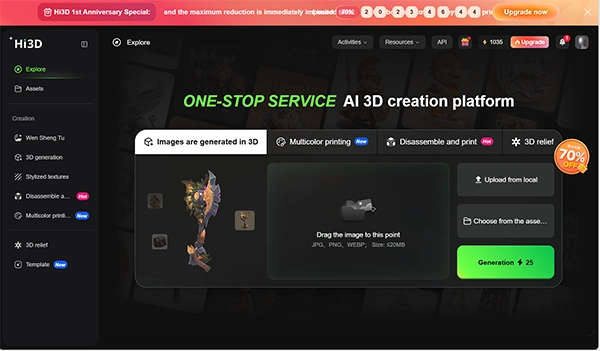
Recently, I had the opportunity of testing an AI-based 3D modeling platform known as Hi3D and used it for one full week. In my opinion, it considerably reduced the time spent on model, color, and print preparation. This review will give you insights into my experience with it and will help you make up your mind about integrating it into your workflow.
KEY TAKEAWAYS
- AI-powered 3D model generation creates clean, print-ready models from text prompts or sketches, reducing the need for manual mesh cleanup.
- Multi-color printing is simplified with automatic color mapping, support for up to 16 filament colors, and 3MF exports that preserve color data.
- Faster design workflows help creators complete complex, multi-part projects in a fraction of the time compared to traditional methods.
- Limited-time anniversary promotions include discounted subscription plans, bonus credits, and early access to the Multi-Color Printing beta program.
1. The Regular Modeler Melt-Down? It’s Officially Solved
To be honest, I’ve tried plenty of tools claiming to be the next big 3D model generator AI, but most of them turned out to be total jokes. What comes out is a beautiful-looking mesh onscreen, only to turn into a messed-up face after importing it into a slicer—impossible to print.
1.1 Zero-Barrier Modeling That Free Users Will Love
But Hi3D actually brings something impressive to the table. Even if you stick to their 3D model AI generator free tier, the model quality is surprisingly solid. You just talk to it like a regular human—say, “a steampunk cat wearing medieval armor”—or drop in a rough sketch. Within seconds, you will get a 3D model with perfect topology and smooth surfaces. The program fully gets your concept without any adjustments to the vertices and grids.
1.2 The Ultimate Holy Grail for Multi-Color Printing Fans
The thing that amazed me about their new development was their latest “Multi-Color Printing” feature, which is pure gold for full-color printing creators. It automatically maps the vibrant textures generated by the AI model generator onto real-world 3D printing filaments, supporting up to 16 distinct colors. After creating a texture, you will be able to save it as a 3MF file with the information regarding color and meshes kept intact. Plus, with its built-in smart plate layout assistant, the system handles the arrangement based on your specific printer profile. The old pain of fiddling endlessly in slicing software is completely gone.
2. Putting It to the Test: Crafting a High-Detail Multi-Part Mecha Figurine
Talk is cheap, so let’s throw some hardcore testing at it. A few days ago, I tried making a large, highly detailed mecha garage kit that required multi-part assembly and precise color segmentation. In a traditional workflow, this would easily take me three full days. With this AI 3D print generator, the speed was insane.
2.1 Slide to Color: AI Handled My Mecha Painting
I started by feeding my mecha concept sketch into Hi3D’s 3D AI model generator engine. Within moments, a highly detailed 3D mesh popped out. Then I enabled the Multi-Color Printing option and gently dragged the color count slider (“Adjust Number of Colors”). To my surprise, the AI immediately analyzed the armor panel lines and matched the corresponding filament colors on my design preview simulator. What used to require me to click the mouse endlessly can now be done in seconds with one simple slider.
2.2 Smart Component Splitting: Goodbye Printing Fails
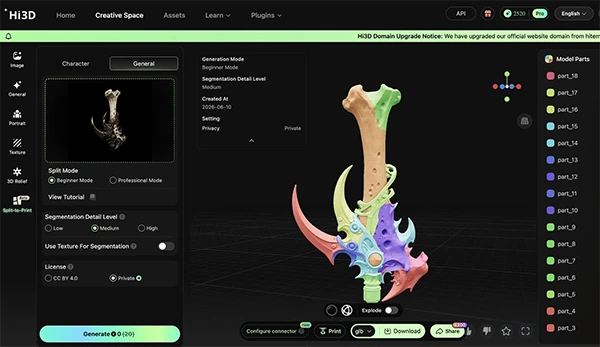
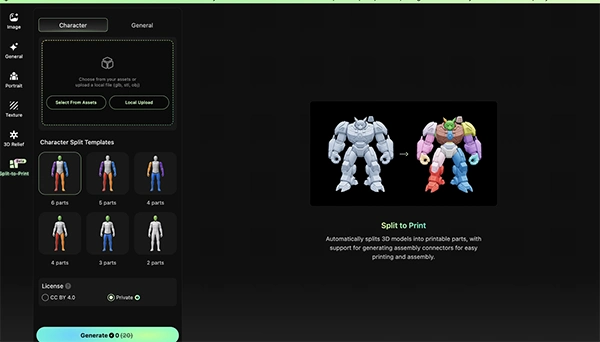
What’s the absolute worst part of 3D printing? Watching your print fail at 90% because a support snapped. This is where the AI-based 3D modeling technology by Hi3D comes out ahead since it perfectly understands the mechanics of physical 3D printing. It automatically executed a smart component separation (“Split Parts”) for the mecha’s arm and leg joints, and the algorithm calculated the safest orientation that uses the least amount of support material. I dropped the exported 3MF straight into my Bambu/Creality slicer, hit print, and nailed it on the first try. It cut my prototyping cycle by over 80%.
 |  |
3. Time to Loot the 1st Anniversary Bash
Now, let’s look at the money part. A tool may be excellent, but how much it costs determines whether it’s worthwhile or not. Luckily, their launch anniversary is happening right now, and they are rolling out a “1st Anniversary Promo” with deals so massive I’m questioning if the founder is planning to retire.
3.1 A Massive 70% Off, Plus Buy One Get One Free Credits
During the event, core subscription plans give heavy discounts of up to 70% off! You will pay just a small amount of money in order to have access to all the premium features. Whether you’re a hobbyist staying on the 3D model generator free tier or a studio lead handling high-volume client orders, jumping on this deal is a no-brainer. On top of that, credit packs are currently “Buy One, Get One Free”—so stock up while you can.
3.2 Limited Beta Slots + Free Credit Giveaways
Not only do they save you lots of money, but they’re also handing out limited slots for the “Multi-Color Printing Early Beta Test.” If you snag a spot, test it out, and leave a quick feedback review, the devs will drop anywhere from 300 to 1,300 bonus credits directly into your account. Having access to a game-changing feature and earning some free credits at the same time is just a perfect deal. Stop waiting around—head over to the Hi3D community. So, why wait? Go ahead and get yours right now!
Conclusion
The platform called Hi3D provides a good AI-enabled solution for those who want to simplify the whole process of 3D printing. It is possible to automate the process of creating a 3D-printable file, multi-color map creation, splitting of the object into several parts, and print optimization.
For those who experiment with 3D printing as a hobby, as well as professionals dealing with complicated projects, this tool may be useful due to its free plan, compatibility with such software as slicing programs, and limited-time anniversary discounts.
FAQs
Ans: It is a platform powered by artificial intelligence for creating 3D models that can be printed from prompts or sketches. Also, Hi3D provides multi-color printing capability and print optimization.
Ans: Yes, there is a free version of Hi3D available where you can create 3D models and explore its artificial intelligence capabilities before subscribing to paid services.
Ans: Yes, it does provide multi-color 3D printing using AI. In addition, Hi3D will map colors to a combination of filament types and save your 3MF file with color information.
Ans: It supports the 3MF format and, therefore, any slicing software that accepts this file format, such as Bambu Studio and Creality Print.