Free Image-to-Image AI: A Practical Way to Repurpose Visual Assets for Small Brands
Small brands generally have a stock of images. But still, they do not have the right image when needed. A product photo from last spring sits unused because the campaign has moved on. A storefront shot or a lower-angle approach looks outdated beside newer content.
A founder portrait works on the website but feels wrong for a holiday newsletter. The pictures exist, yet each one seems locked into the job it was first made for.
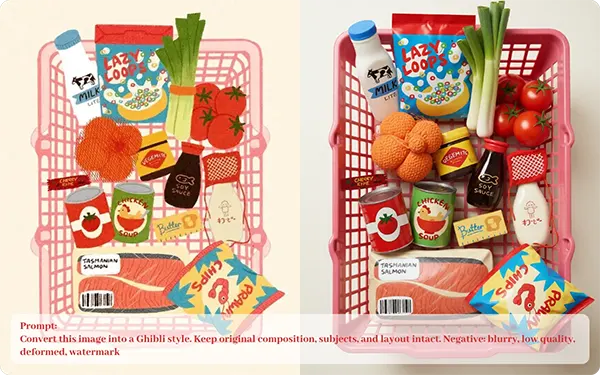
Free image-to-image AI offers a practical way to unlock them, because it lets a brand reshape what it already owns instead of paying to start over.
Why Repurposing Matters More Than Producing
Most small brands treat visual content as a part of new production: a new shoot, a new graphic, a new design for every event. That approach is expensive and exhausting, and it leaves older assets forgotten in folders. Bigger companies get around this by building systems in which one strong image becomes several variations. Small teams can borrow the same logic without the same price bracket.
Repurposing is not about laziness or cutting corners. It is about knowing that a good photograph carries value well beyond the first use. The composition, the product, the subject, and the brand identity are all still there. What often needs to change is the mood, the background, the color palette, or the style, and those are exactly the things image-to-image tools are curated to adjust.
How Image-to-Image AI Works in Plain Terms
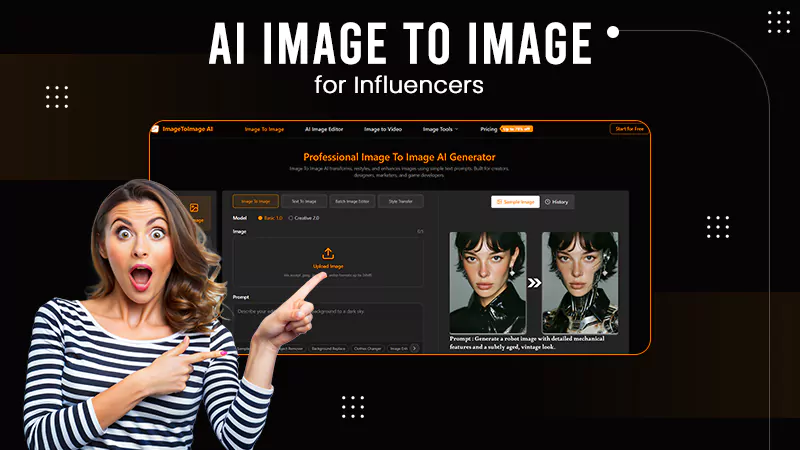
Image-to-image AI starts with a picture you upload and a short instruction describing what you want to change. The platform uses your original as a guide and produces a new version. The structure of the scene stays recognizable, while the look shifts depending on your request. You might ask for a warmer color mood, a different tone, a more illustrated style, or a cleaner and brighter background.
This is different from generating an image purely from text. When you start with your own photo, the result stays connected to something authentic. For a small brand, that connection is essential, because customers expect marketing to reflect the product they will really receive. The tool changes the presentation without inventing a different product.
Getting Started with Ezeditor
Ezeditor is a browser-based software that makes this process simple. You upload an image, describe the change, and review the result without installing any application or learning complicated menus. Because the Free image-to-image AI is free to try, new brands can test it on real assets and verify the quality before committing any budget. That low-risk start is valuable, since the only dependable way to know whether a tool suits your images is to try it on your own.
As with any free service, it is suggested to read the usage terms. Limits on resolution, number of generations, or commercial use can vary from one plan to another, and these details matter before outcomes appear in paid advertising or printed materials.
Seasonal and Campaign Refreshes Without a New Shoot
One of the most useful implementations for small brands is seasonal adaptation. A candle company, a bakery, a clothing label, or a garden shop all sell variously across the year. Rather than arranging a new photoshoot for every season, a brand can take one well-composed product image and restyle it with Ezeditor to match spring pastels, summer brightness, autumn warmth, or winter coziness. The product stays the same, while the surrounding atmosphere changes to suit the moment.
This approach also helps with timing. When a promotion is introduced on short notice, waiting weeks for new photography defeats the purpose. A quick adaptation of an existing picture lets the brand respond within hours, which can be the difference between participating in a trend and ignoring it.
Building a Consistent Look Across Channels
Consistency is one of the strongest elements of a professional brand, and it is also one of the hardest aspects for a small team to maintain. Photos taken on different days, in different light, with various devices tend to look unrelated when placed side by side. Customers may not consciously notice, but the overall impression seems scattered.
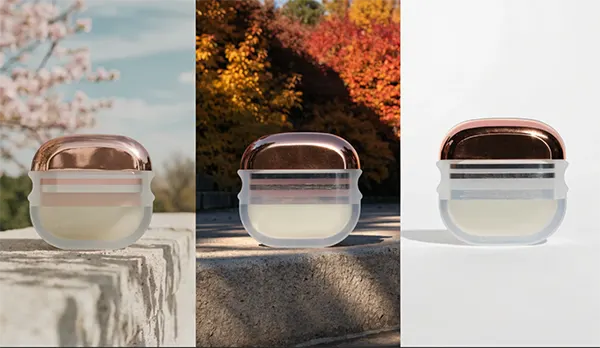
Image-to-image AI can easily unify these assets. By describing a shared color mood, lighting style, or background treatment, a team can nudge a mixed collection of images toward a common look. A short style note that records the prompt used for colors and atmosphere makes this easier, because the same descriptors can be reused each time. After a few weeks, the brand’s website, social profiles, and email campaigns start to feel as if they came from the same creative hand.
Adapting One Image for Many Formats
Every channel has its own requirments. A website banner is wide and needs space for text. A social post generally works best as a square with a bold focal point. A story format is vertical and fast. A product page demands a clean, distraction-free backdrop. Producing a separate image for each of these from scratch is slow, but adapting a single source image is far more manageable.
With Ezeditor, a brand can tune the same image for each context, simplifying the background for a product page, shifting the mood for a social post, or generating a calmer version for an email header. The core subject stays steady, so the brand remains recognizable everywhere it appears.
Testing Ideas Before Spending Money
Minor brands cannot afford to guess wrong with large campaigns, which makes cheap testing particularly valuable. Before committing to a packaging concept, a new color direction, or a storefront refresh, a group can visualize a few options from existing images and show them to customers, friends, or colleagues. Feedback arrives faster, and weak ideas are dropped at almost no cost.
The same applies to advertising. Generating many versions of an image with different moods allows a brand to see which one grabs more attention. Over time, those small experiments build clearer insights of what the audience prefers, and decisions become based on evidence instead of instinct.
A Straightforward Workflow for Small Teams
A reliable routine keeps the process manageable. Start by choosing a handful of strong source images, favoring sharp focus and optimal lighting, since better inputs produce better results. Decide what each photo is meant to do, whether that is a product listing, a social post, or a campaign banner. Provide a clear instruction that mentions the mood, colors, and any element that must remain unchanged. Create several versions rather than settling on the first, compare them against your brand style, and then select the best one in your usual design tool by adding text, logos, and layout. At last, compress the file before publishing so pages load quickly, particularly on mobile connections.
Mistakes That Can Weaken Your Brand
The most overdone mistake is over-editing. Oversaturated colors, plastic-looking surfaces, and unnatural lighting make audiences suspicious and can ruin credibility. Another is misrepresentation. If a product photo is altered, it must still show the real item accurately, because disrupted visuals lead to returns, complaints, and lost trust.
Detail issues also deserve attention. AI-generated edits can distort text, edges, or small objects, so every photo should be inspected closely at full size before publishing. Finally, always confirm that you own or have permission to use any image you upload, particularly images of people or work generated by others.
Where Human Judgment Still Leads
Technology enhances production, but it does not define what a brand stands for. Someone still has to select which images fit the message, whether the tone feels right, and when an edit has gone too far. Flagship assets such as a logo, a signature product shot, or an important campaign may still deserve professional design or photography. The most impactful approach treats image-to-image AI as a quick assistant for variations, drafts, and refreshes, while people stay responsible for results and quality.
Conclusion
Small brands do not need to generate endless new visuals to stay fresh. Often the better move is to look again at what they already acquire and ask how it could serve a new purpose. Free image-to-image AI makes that possible by transforming existing photos into seasonal refreshes, consistent channel assets, and test-ready variations at very little cost. Select one image from your archive today, upload it to Ezeditor, and try a single change in light or background. That one experiment may show you how much value your visual library has been holding all along.
FAQs
Ans: Image-to-image AI transforms an existing image based on instructions, allowing users to change its style, colors, lighting, or background.
Ans: Small brands can refresh product images, create seasonal visuals, adapt images for different platforms, and test campaign ideas without arranging new photoshoots.
Ans: Yes. Review each image for distorted details, unnatural lighting, inaccurate product features, and consistency with your brand identity.