The Rise of AI Coding Agents: How Developers Can Combine Multiple AI Tools for Better Results
Jump To Key Section
- Multi-Agent Collaboration: A New Way to Build Software
- AI Coding Tools and Assistants
- Cursor and Claude Code
- OpenAI Codex
- Multi-Agent Coding Workflows
- Benefits of Combining Multiple AI Coding Tools
- Alook.ai vs Relevance AI: Collaboration and Automation
- How Alook.ai Brings AI Agents and Developers Together
- Conclusion
- Frequently Asked Questions
Using AI in this manner can deliver inconsistent results depending on the model. The interface and workflows are used by different AI coding assistants.
As projects get extensive, it can be a problem to switch between IDEs, the terminal, testing and AI chat.
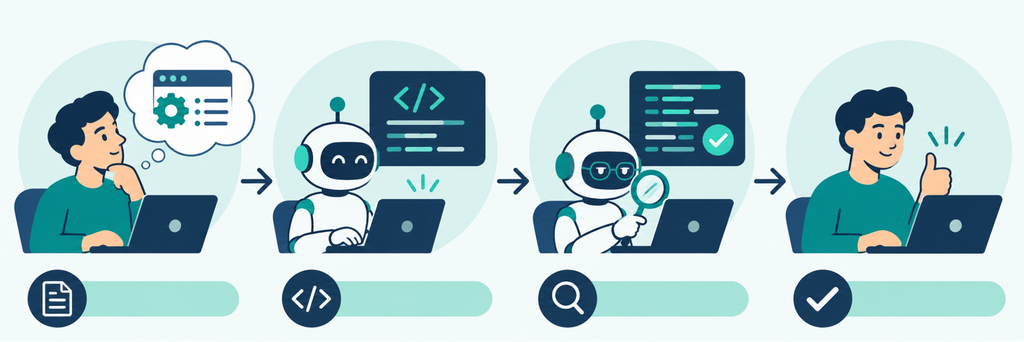
By using multiple AIs like Cursor, Claude Code and OpenAI Codex. The different tasks can be assigned to each assistant.
They can then validate each other’s work and provide guidance.
In Git, separate worktrees can be used to avoid conflicts. To get the best results, tasks should be clearly defined, have efficient workflows and should be reviewed by a human.
Multi-Agent Collaboration: A New Way to Build Software
Multi-agent collaboration can create software. Different agents can be used to accomplish specific aspects of development.
An agent may be used to generate code. Another may be used to study for bugs in the generated code.
Another agent may create modifications or test cases. The developer can then look at the outcomes and choose which changes to implement.
AI Coding Tools and Assistants
AI can be used to create code more efficiently. Large Language Models help in coding by automatically creating code, supplying suggestions for error fixing, and explaining errors.
Some coding tools work within coding environments, while others perform in a command-line interface (CLI).
Regardless of how they work, these tools aim to improve software development efficiency.
The most common uses of AI in coding are
- Code Generation: Develop a piece of code, function or script based on a natural language query.
- Debugging: Find any problems and supply solutions.
- Code Review: Check regulations to determine missing features, possible bugs, and problems.
- Testing: Create tests and identify issues so they do not occur in launched software.
Cursor and Claude Code
Cursor permits you to interact with AI in code. Claude Code allows you to execute various development assignments.
It includes understanding your codebase, running terminal commands, making changes to files, and performing multi-step development tasks.
Cursor vs Claude Code is not always a choice between two competing tools. For example, Cursor can be used interactively.
Claude Code can be used through the command line interface to debug an issue or make larger transformations to the project.
Alook connects supported local runtimes, including Cursor CLI and Claude Code, to an owner’s computer.
Their agents can join a shared server and experience in channels with the suitable credentials.
Within a single chat, developers can add both bots, specify roles for each bot, give clear instructions to complete tasks, and review the outcomes of each bot.
This allows easy collaboration between developers and AI assistants.
OpenAI Codex
This is another coding AI tool that allows developers to complete various tasks. This can include writing code, debugging code, testing code, and scrutinizing changes.
Using multiple agents, Codex can be very helpful.
For instance, during the development of an application. You ask Claude Code to implement a certain feature.
You can then check what has been implemented in the code using Codex. If there are any missing proofs or bugs, then there is a chance to enhance the agents’ functionality.
Multi-Agent Coding Workflows
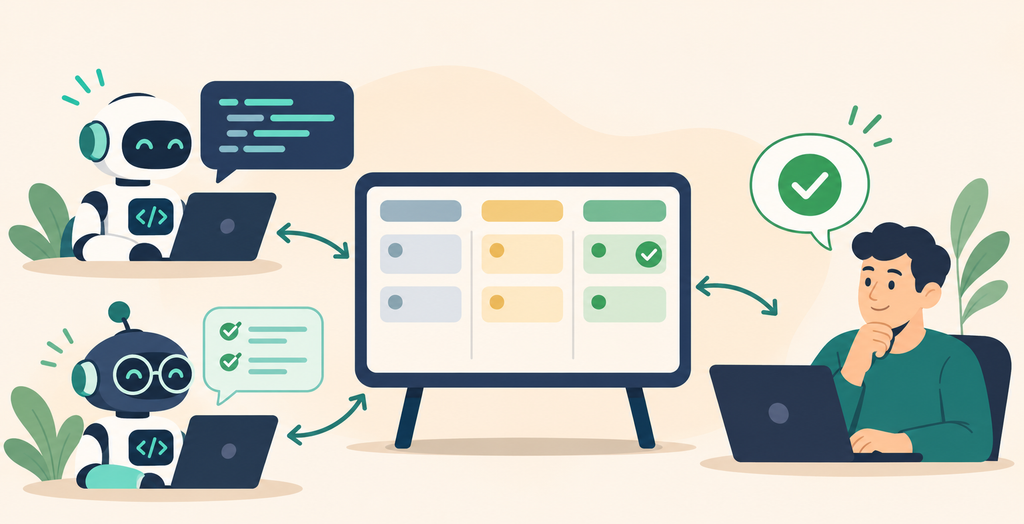
In order to get an efficient workflow involving multiple agents, make sure assignments are clearly specified, assigned, and transmitted. Simply using multiple AI tools may not be sufficient.
Define the Task
Identify what you want to be designed. Fixing issues with login functionality or adding functionality.
Allocate Tasks
Give one agent the task of finding and resolving the problem, and give another agent the task of reviewing for solutions.
Provide Context
Share the relevant requirements and artifacts, and ensure that each agent has access to the files it needs. A shared dialogue does not automatically provide access to another computer’s local files.
Modify
Let the trusted agent create the needed transformations to the code.
Check for Errors
Ask another agent to review for failures.
Benefits of Combining Multiple AI Coding Tools
Using further AI coding agents together can enhance development workflows in several ways.
- Better code quality: One agent can examine another agent’s output and specify problems that may otherwise go overlooked.
- Faster development: Developers can split complex jobs into shorter pieces and operate on them with various agents.
- Different perspectives: Multiple agents may present different strategies to the same programming situation.
- Less manual communication: Shared conversations reduce the need to copy messages and instructions between separate tools.
- Improved teamwork: Developers can affect teammates and AI agents in the same conversation.
- More efficient reviews: Agents can check changes, recommend fixes, and help demonstrate finished work.
Alook.ai vs Relevance AI: Collaboration and Automation
Alook and Relevance AI support various ways of working with agents. Alook concentrates on transmitted conversations with agents running on users’ computers. Relevance AI provides tools for creating agents and automating workflows.
| Feature | Alook.ai | Relevance AI |
|---|---|---|
| Free plan | $0/month | Free access offered |
| Entry paid plan | $20/month (Studio) | Not publicly listed |
| Higher-paid plan | $40/month (House) | Custom pricing |
| Agent support | Multiple AI agents | Multiple AI agents |
| Shared conversations | Yes | Workflow collaboration |
| Main focus | Agent collaboration | AI workforce automation |
Alook costs displayed are monthly USD rates checked on November 23, 2026; model and runtime expenses are different.
Relevance AI lists custom enterprise pricing and directs teams to contact sales. See alook.ai or pricing and relevanceai.com or pricing for existing markers.
How Alook.ai Brings AI Agents and Developers Together
Some useful benefits of the Alook cooperation workflow include
- Connect supported Cursor CLI and Claude Code runtimes on your computer, then add the corresponding agents to a shared server.
- Have team members, Claude Code, and Codex agents all in the identical chat.
- Work on the exact assignment with Claude Code and Codex, with well-organized tasks and assessments.
- Recognize using one agent, and create and test the fix using another.
- All team members, Claude Code and Codex, can be put in the same place to debate their improvements and have code checked.
Conclusion
Many AI coding tools exist, which include Cursor, Claude Code, and OpenAI Codex. Integrating these tools can support developers to coordinate AI-assisted coding jobs.
Alook.ai is a tool where several users and coding associates cooperate in a workflow.
In contrast to contending with Cursor, Alook.ai permits developers to incorporate several AI coding assistants into one environment.
While Cursor helps with AI coding, Alook.ai permits various AI agents to communicate.
Frequently Asked Questions
Does using multiple AI coding tools improve code quality?
Yes. Different AI agents will be able to identify bugs, design issues and edge cases. The final code should be reviewed, tested and supported by a developer.
What are Git worktrees used for in multi-agent coding?
Worktrees allow each agent to have their own interpretation of the repo. Multiple agents can work and examine code in parallel, decreasing conflicts.
How does Alook.ai differ from Relevance AI?
Alook aims to link developers to current coding agents. Relevance AI aims to design and automate multi-agent workflows in companies.
What is the most significant risk to multi-agent development?
Competition in development, identical code and repetitive code may occur if agents aren’t well coordinated. This can be reduced by clearly defining tasks, creating separate working environments and having human oversight.