Doorbell Camera with Local Storage: Best Picks & Guide
Jump To Key Section
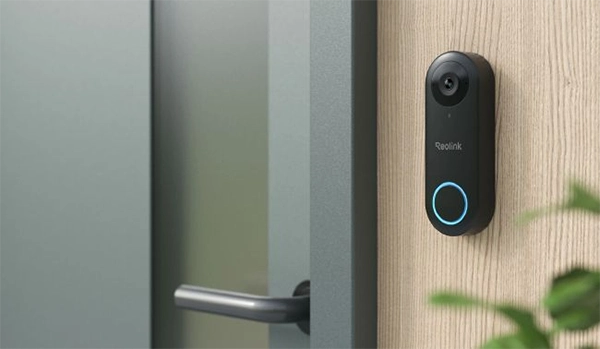
Every modern homeowner wants reliable home security. And a doorbell comes up at the top of the list. You know how? With local storage. Yes, they are possible with local storage, which allows them to store data without any external device. Along with this, it comes without monthly recurring charges.
Even when there is no internet and you have not paid those recurring fees, they will work the same way as they were working. This makes them perfect for modern homes.
Keep reading this guide to explore the best picks for doorbell cameras with local storage.
What Are the Different Local Storage Options for Doorbell Cameras?
There are a wide range of local storage options available for doorbell cameras:
microSD Card
microSD card is the most readily available local storage option, and also the most desired one. The reason is that people can easily slip in a microSD card. It’s reasonably priced and user-friendly. Just lay down the card, and the doorbell is ready to work.
NVR
Doorbell cameras can also be connected to a useful NVR for storage. It’s a helpful option for users who already have an NVR and a security camera system. It offers a gigantic storage space, which is why it’s advisable to retain videos for a longer period.
Home Hub or Base Station
Some doorbell cameras can work with reliable home hubs and base stations. With this, they can store videos in an encrypted and completely secure storage. It restores privacy and reduces the likelihood of data leakage.
Also, explore how AI can help ecommerce brands increase sales and save time.
What to Look for in a Doorbell Camera with Local Storage?
Not every local storage serves the same purpose. Here are things to consider while choosing a doorbell camera:
Storage Location and Capacity
The first thing you should identify is the storage location, such as a microSD card, NVR, or base station. Depending on your tastes, you can opt for a suitable doorbell camera. Also, consider the capacity of the storage. For instance, the biggest microSD card that the doorbell can support.
No-Subscription Features
Look for a doorbell camera that does not need a subscription or monthly fee. It is required if you want to avoid recurring expenses. Secondly, make sure the doorbell camera delivers all the advanced elements, such as smart detection, real-time alerts, live feed, and remote access, without any subscription.
Power Option
Video doorbells come in distinct power options. You can opt for a PoE doorbell that needs an Ethernet cable for power and connectivity. It offers outstanding reliability and performance. You can also opt for plug-in Wi-Fi doorbells. They are unfailingly powered to work all day. The easiest and most movable option is a battery doorbell, as it does not require any wiring.
Connection
For optimal reliability and superior speed, the best option is a PoE video doorbell. It communicates with the internet through the Ethernet cable. You need to join it to the router. The second option is a Wi-Fi doorbell, which does not need any wiring, but the Wi-Fi range has limitations.
Resolution (Field of View)
Consider the resolution of the video doorbell. For clear outcomes and rich details, go with a 2K or higher resolution. Also, check the domain of view. It gives you a picture of the area that the camera records.
Smart Detection
Smart detection is a must-have component that detects objects instantly. It can discern between persons, animals, and motorcars and send real-time alerts to the connected devices.
Smart Home Compatibility
The video doorbell should be consistent with smart home systems. It allows users to work or command the doorbell hands-free through voice commands. Most video doorbells allow Google Assistant and Amazon Alexa.
How Much Local Storage Does a Video Doorbell Need?
The local storage needs trust on whether you are recording continuously or in motion-triggered mode. Secondly, it leans on the video resolution.
Let’s say the video doorbell records videos in 2K resolution. In this case, for ongoing recording, go with a doorbell that helps at least 256GB storage so that you can keep videos for longer. If you want to store videos only in motion detection mode, then an advised option is 128GB. In addition, you can also go with 64GB.
A 32GB microSD card can keep 14-18 hours of 2K videos. A 64GB card can document 28-36 hours of 2 K (4MP) video, 128GB can record 55-76 hours, and 256GB can record 110-144 hours. Some doorbell cameras also reinforce 512GB cards that can store 220-288 hours of 2K (4MP) videos. In motion detection mode, these storage choices include videos for longer.
Best Doorbell Cameras with Local Storage
Below are some of the most notable doorbell cameras available with local storage:
Reolink Battery Video Doorbell (2nd) – Best Battery Doorbell with Local Storage
Reolink Battery Video Doorbell (2nd) is a battery-powered wireless doorbell with a battery vitality of up to 10 months on a single charge. It’s fully wireless and allows users to store videos in local storage, such as a microSD card (up to 512GB), Reolink NVR, Home Hub Pro, and FTP/NAS.
It records videos in 2K (4MP) resolution, which captures a head-to-toe view. Furthermore, it’s also fitted with HDR technology and night vision to record clear videos all day. With smart detection, it can notice persons, animals, vehicles, and packages. The unique feature is the smart home compatibility with IFTTT support. Users can easily join it to other platforms securely.
Reolink Video Doorbell PoE – Best for 24/7 Local Recording
Reolink Video Doorbell PoE is a wired doorbell for 24/7 dedicated performance. It holds videos in local storage, such as a microSD card (up to 256GB), Reolink NVR, FTP/NAS, and Reolink Home Hub. It can record videos constantly, on motion detection, and according to a specific plan.
It records videos in 2K+ resolution and smartly catches persons and packages in real-time. It sends real-time alerts to the related devices. Users can enjoy all elements and store videos in the local storage free of any monthly fee.
Reolink Video Doorbell Wi-Fi – Best for Existing Doorbell Wiring
Reolink Video Doorbell Wi-Fi is a wired doorbell that you can tie to your existing doorbell wiring. It gets uniform power and records 24/7 in local storage. The local storage choices include a microSD card (256GB), Reolink Home Hub, FTP/NAS, and Reolink NVR.
The video doorbell documents in super HD 5MP resolution. It witnesses persons, vehicles, and animals without any fee. It’s a Wi-Fi doorbell, and it backs dual-band Wi-Fi for better connectivity and performance. It also offers adjustable chime options, including Reolink Chime, Alexa Echo Show, and Google Assistant.
Cloud Storage vs Local Storage Doorbell: Which Is Better?
Cloud storage has a fixed recurring cost. Once you subscribe, the recorded video is instantly uploaded to the cloud, so there is no risk of theft. You can check out the video even if the video doorbell is robbed. However, there is a risk of privacy attack and data breaches. It also stops recording if your subscription lapses or the internet is not available. Keep in mind that cloud storage is designed for motion-triggered clips in most cases.
Local storage gives you complete liberty. You can store videos without internet reliance. You have full control over the hardware, so there is no risk of privacy breaches. It also sustains 24/7 recording along with sensor-triggered clips. And the best part is that it’s entirely free.
Also, learn how AI is changing competitive advantage in business.
Final Words
At the end of the day, investing in a video doorbell can be called one of the most effective ways to secure your front door without messing up with monthly fees. Whether you want an easy setup of a wire-free battery unit, the convenience of not paying bills each month or strong reliability, the right setup provides smart alerts and clear video on your own terms.
Choose the power options that match your needs, and enjoy peace of mind with zero hidden fees.
FAQs