A Guide to Improving App Safety in 2026
“No internet-connected technology is unhackable.” — Abhijit Naskar (Neuroscientist)
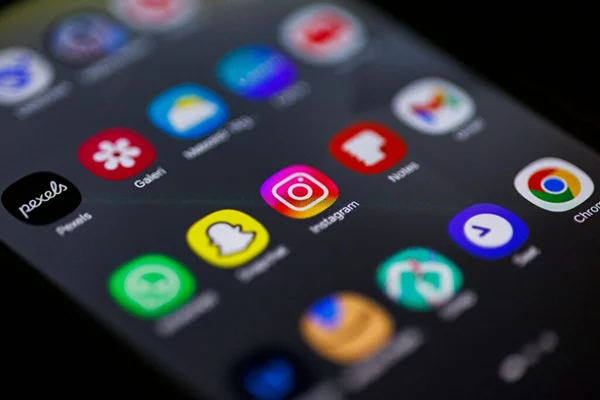
Most people don’t even think twice before downloading and installing apps. They open it and start clicking “Allow” on permission requests until the prompts stop.
This ignorance towards security is borne out of the convenience these applications provide. These apps include all from banking, messaging, and shopping to maps, streaming, and social media. But the truth is that data security issues come with applications like these.
However, in 2026, people are getting serious about their data privacy. Canada’s National Cyber Threat Assessment 2025–2026 clearly states that people are worried about cyber issues. This raises a question about our present digital habits.
In this guide, I’ll tell you how to improve app safety in 2026. The following sections discuss in detail things like data protection, awareness around shady applications, app permissions, and updates related to apps and the system.
KEY TAKEAWAYS
- People are getting more and more dependent on their phones, especially applications that make their lives easier.
- However, security issues and cyberattacks are also growing.
- Carefully download any app, keeping in mind your data privacy and permissions requests.
- Keep your system and applications updated to avoid security vulnerabilities that allow cyberattacks.
Protect Your Data
You only see what the app shows you. And it’s for maintaining simplicity and convenience as well. You might not be able to process all the information that an application handles.
Most of the app activity happens in the background, even when you’re not using it, such as:
- Sync accounts
- Refresh content
- Collect diagnostics
- Process payments
- Transmit personal information
Safer application use starts with understanding how your data moves. For example, understanding what is a VPN vs Proxy can help users make more informed choices because a VPN protects an entire internet connection, whereas most proxies work on a per-app basis. For everyday users, that distinction matters most when privacy and secure connections are part of the goal, especially on shared or public networks.
Be Careful What You Download
You must have heard news about Google removing some apps from its application store due to security reasons. This happens almost every quarter.
What this proves is that even a reputable app store like the Google Play Store cannot screen all the security vulnerabilities of an application.
Hence, before installing anything, it falls upon you to check:
- Whether the developer looks credible
- Whether the app has been updated recently
- How recent reviews read
- Whether the permissions or features actually make sense for what the application claims to do
A simple calculator app asking for extensive contact access should raise questions. So should applications that are promoted through random ads, direct messages, or pop-ups that try to rush the download. One of the easiest ways to reduce risk is to avoid sideloading apps or installing software from links you did not go looking for yourself.
Review App Permissions
Personal data leaks have become a monthly affair now. And people wonder how that happens. It’s you who actually “allowed” that shady application the unlimited reach to your device and data.
Many apps request permissions that don’t even concern their functions, like:
- Location
- Microphone
- Camera
- Contact
- Media access
The following infographic lists the permissions that apps frequently request:
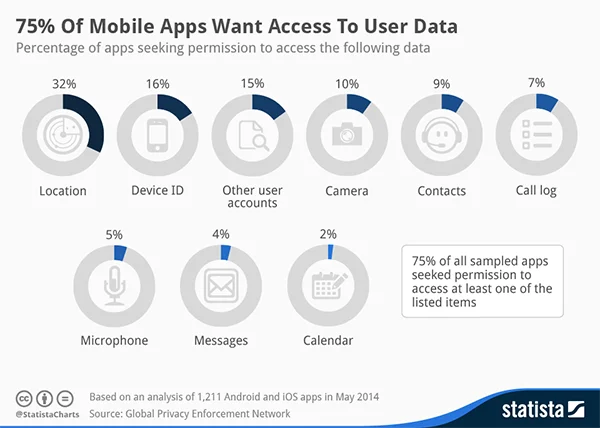
For users, the practical lesson is simple: review permissions regularly and turn off anything that feels excessive. Limiting access will not make every application safe, but it does reduce how much of your personal information is exposed if an app is poorly designed, overly intrusive, or compromised later on.
Keep Your Apps and Device Up to Date
Sometimes the application itself is clean, but some security vulnerabilities inside allow cybercriminals to take advantage of it.
The only way to protect yourself from attacks like these is to keep your system and apps updated.
Application and operating system updates often include fixes for known vulnerabilities. Delaying them can leave devices exposed to weaknesses that attackers can leverage. In practical terms, keeping apps and devices up to date is not housekeeping. It’s part of basic digital self-defence, especially for applications used for money, messaging, work, or personal information.
Conclusion
Cyberattacks are getting more sophisticated with time. At the same time, people are getting more digital, installing one app after another.
Application developers are doing everything in their capacity to improve app security, but the onus also falls upon the general public to take precautions.
Always be aware of the app you’re installing, the permissions it’s asking for, and keep your system and applications updated to protect yourself from the latest cyberattacks.
FAQs