DemandSage data of 2026 says there are 300 million daily active users of Zoom worldwide, a dramatic increase from 10 million in 2019. As distributed work becomes standard rather than temporary, the technology connecting employees to business systems has shifted from a convenience to a core operational necessity.
Selecting the right remote desktop software is one of the most important technology decisions a business can make, as it improves productivity, simplifies support, and ensures employees can work effectively from anywhere.
These solutions allow users to access and control a computer from another device through the internet. It recreates the experience of sitting directly in front of a workstation, making files, applications, and systems available regardless of location. For businesses supporting remote teams or flexible work arrangements, the software you choose directly influences operational efficiency. Workshop Software can also be used to organize service-related information and workflows for businesses that manage vehicle maintenance remotely.
When comparing available options, focus on key areas such as performance, security, compatibility, ease of use, scalability, and long-term cost. Understanding how these factors affect day-to-day operations helps narrow the field and avoid expensive mistakes later.
Researching how to choose remote desktop software across different use cases and deployment environments is a practical starting point, since business requirements often differ based on team structure, industry, and technical demands.
In this article, I’ll explain how to choose the right remote desktop software by evaluating performance, security, scalability, compatibility, and cost.
KEY TAKEAWAYS
Test remote desktop software under realistic network and workload conditions before purchasing.
Security features like multi-factor authentication and encryption should never be optional.
Cross-platform compatibility ensures employees can work effectively across different devices.
Consider long-term scalability and ownership costs, not just the monthly subscription price.
Assess Your Performance Needs
Performance issues are usually the first thing employees notice as they make remote work genuinely difficult:
Laggy connections
Screen rendering delays
Poor audio quality
Before committing to any solution, consider the bandwidth requirements your team typically operates within and whether the software performs well under those conditions.
Some solutions are optimized for high-performance use cases such as graphics-intensive work, video editing, or engineering applications. Others are built primarily for basic office tasks. Test the software under realistic conditions, particularly if your team works from varied network environments, including home broadband, shared office connections, or mobile data.
Response latency matters more than many businesses initially expect. A solution that feels smooth during a product demo may perform very differently when multiple users are connected simultaneously across different time zones.
Prioritize Security Features
Remote desktop software effectively creates a doorway into your internal systems, which makes security a grave concern. Weak security controls can allow unauthorized access to:
Sensitive data
Internal applications
Client information
When reviewing options, look for end-to-end encryption, multi-factor authentication, session logging, and role-based access controls. These features collectively reduce the risk of unauthorized access and provide visibility into who is accessing what and when.
Understanding endpoint security basics is valuable context when assessing these solutions, since the devices connecting to your network are themselves a significant part of the overall security equation. A solution that integrates cleanly with your existing security tools will be far easier to manage than one that operates in isolation.
Compliance is equally important. If you’re in a highly regulated industry like healthcare, finance, or legal, your remote desktop software must meet specific standards around:
Data handling
Audit trails
Access control
Evaluate Device and Platform Compatibility
Modern workplaces operate on a mix of devices and operating systems. A solution that works seamlessly on Windows may have limited functionality on macOS, or it may not support mobile access at all. Before selecting software, map out the full range of devices your employees and IT staff use.
Cross-platform support is especially important for businesses with hybrid teams or bring-your-own-device policies. The software should provide a consistent, functional experience regardless of whether someone is connecting from a Windows laptop, a Mac, an iPad, or an Android phone.
Also consider the devices being accessed remotely, not just the devices initiating the connection. If your servers or workstations run older operating systems, confirm compatibility before committing to a solution.
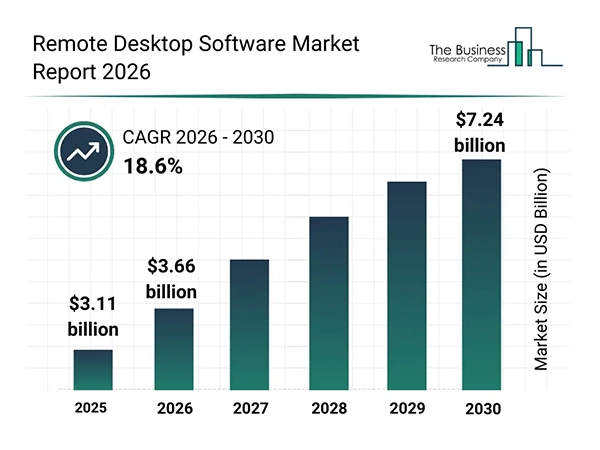
MARKET STATUS The remote desktop software market is growing rapidly. From $3.11 billion in 2025 to $3.66 billion in 2026, the CAGR is 17.8%. It’s expected to reach $7.24 billion by 2030.
Consider Ease of Use and IT Management
Even feature-rich software loses value if employees struggle to use it. The right tool should offer:
Intuitive interface
Clear documentation
Responsive customer support
For IT administrators, centralized management is a major practical benefit. The ability to deploy the software across multiple devices, monitor active sessions, enforce security policies, and revoke access from a single console dramatically reduces administrative overhead.
Understanding how application software categories and evaluation criteria differ helps IT decision-makers frame their assessments more rigorously, particularly when comparing solutions with overlapping feature sets and similar marketing claims.
Onboarding time also matters significantly. A solution that requires minimal configuration and allows employees to connect quickly will deliver value faster and reduce the burden on IT during rollout.
Think About Scalability and Total Cost
Today’s perfect solution can become tomorrow’s limitation. Consider whether the software scales comfortably as your business grows, and whether the pricing model remains sustainable at larger user counts.
Many remote desktop solutions offer per-user or per-device licensing. As headcount grows, so does the cost. Understand the full pricing structure, including any fees for premium features, additional device support, or advanced security controls.
Evaluate the total cost of ownership across a multi-year window rather than focusing solely on the initial subscription price. Factor in the cost of support, training, and any integrations required to connect the software with your existing IT infrastructure.
Test Before You Commit
Take full advantage of free trials. Involve the people who will use the software daily, not just IT administrators, and gather feedback on the experience.
Run the software under realistic load conditions, test connections from the types of networks your team uses, and confirm that any features critical to your operations work as expected. Evaluate support responsiveness during the trial period as well, since the quality of technical support becomes very apparent once you encounter an actual problem.
The trial phase is also a good time to assess vendor transparency. A trustworthy vendor will be clear about pricing, limitations, and product roadmap. Ambiguity during the evaluation stage tends to carry forward into the long-term support relationship.
A solution with a flexible licensing model, strong performance record, and active development roadmap will consistently prove to be a better long-term investment than one selected primarily based on a lower upfront cost.
FAQs
Security is generally the most critical factor for business use. The right solution will offer end-to-end encryption, multi-factor authentication, and detailed session logging. Performance and compatibility are also important, but they should never come at the expense of strong access controls and data protection.
Review the vendor’s licensing model and pricing tiers carefully. Ask specifically how pricing changes as your user count grows and whether features available on lower tiers remain accessible as you scale. Piloting the software with a representative group before full deployment gives you a clearer picture of how it performs under realistic load.
It can be, provided the solution meets a minimum security threshold. Businesses handling sensitive data should confirm that the software uses strong encryption, supports multi-factor authentication, provides role-based access controls, and maintains audit logs. Compliance with industry standards relevant to your sector should also be verified before deployment.
Bhupinder Kaushik, with proficiency in business, is working as a business content writer for Allinsider. While studying for a Bachelor of Business Administration from GGSIPU, he has gained foundational business knowledge, which he uses to write business-related articles.