Birthday Video Ideas: Creative Ways to Turn Photos Into a Personalized Gift
Jump To Key Section
- Creative Birthday Video Ideas to Make Someone Feel Special
- How to Choose the Right Photos and Video Clips
- Turn Your Photos Into an Emotional Birthday Story
- Birthday Video Editing: Tools and Features to Consider
- How to Create a Personalized Birthday Video Gift with Music
- Common Mistakes to Avoid When Making a Birthday Video
- Final Tips for Creating a Memorable Birthday Video
- Frequently Asked Questions
Birthday presents are transient in their effect. A customized birthday video can offer a more lasting impact.
It is able to collate and relive special occasions and experiences. You could produce a basic life story by adding amusing stories. It also gets people to film birthday greetings.
No specialist video production knowledge is required. Select significant images, add concise image titles and ensure that audio is well balanced. Preview your video and then share it.
Design a personalized present to make a birthday slideshow with music. This can be achieved by adding together significant images, along with favourite music and emotive text. No specialist knowledge is needed.
You can design something that feels thoughtful and memorable without needing advanced video editing skills.
Creative Birthday Video Ideas to Make Someone Feel Special
Before you go and open up a birthday video maker, think about the person you’re creating it for. Their personality, what they’d be curious about. The nature of your relationship with them will all be factors in deciding what design you go for.
Photo Slideshows Filled with Memories
A photo slideshow is the obvious alternative for parents, grandparents, partners and close friends.
Collect the photos from different stages in the person’s life, starting with childhood and working through to recent holidays, family occasions and everyday aspects of life.
Short captions, dates and background music can go a long way to give the entire thing a more personal feel.
This is the layout that works best for milestone celebrations on 30th, 50th, and 70th birthdays. Where the significance of the different stages in life is so very much in the memories.
Video Collages and Best-Moment Compilations
Do you have a mixture of photos and short clips? Put them all together in a video collage. That could be your holiday pictures, your birthday photos, the funny periods, the family affairs and random moments.
This works for the more extroverted types, people who have multiple friends and tons of things in common.
To avoid it simply being a random variety of clips, you’ll want to segment it. Travel, hobbies, family life and identical themes can each have their own faction.
Birthday Greetings from Friends and Family
A video greeting card can bring people together who simply can’t celebrate in the same room. It’s a very nice thing to do if your friends and relatives extend across the country or certainly the world.
Ask everyone to record a very short statement on their phone. Some will no doubt be saying well done on the birthday.
Others will be saying something more along the lines of “remember that time we…?” or “this is what I really enjoy about you”.
Edit them all into one piece of video, with the name or a very short intro to remember each person.
Themed Videos with Music and Animation
A birthday video can also be founded on something the person really likes.
For a film enthusiast, a movie trailer style video would be perfect. For someone who adores travel, you could put together a string of experiences with the appropriate destinations captioned in.
Animated titles, suitable colors and proper music all help to designate the theme. A more playful representation might well call for more animated effects.
A more refined piece of work may be better served by more restrained changes and softer music. The animation should be there to improve the photographs instead of compete with them.
How to Choose the Right Photos and Video Clips
The basic material you pick has a far greater impact on the final video than the number of editing effects you apply.
A well-chosen batch of photos is going to suggest a far better story than a thousand disparate pictures.
Search your phone, your computer, your cloud storage, and your physical photo albums.
Look for exact photos of real expressions, real people, real places and real incidents that the birthday individual will actually recognize.
Mix old and recent photos. The old ones will bring a sense of memories. The recent ones will connect it to the recipient’s life at the moment.
Your own stakes are worth keeping in mind too. A picture of your pet of choice, a particular favorite place to go on a hike or a regular family tour. This is more meaningful than a standard posed photo.
Be on the guard for copies and photos that are almost identical. There’s no point in possessing a photo just because you own it.
Ask your family and friends to transmit in their own groups. They will have photos from school days, early friendships and the like that you’ve never seen.
Once you’ve got everything piled together. Create a particular folder and get rid of any repetitive documents.
Having all your material in a single place makes the editing procedure a whole lot easier.
Turn Your Photos Into an Emotional Birthday Story
The order of your photos can totally alter the feel of your birthday video. Instead of just adding the photos as you go and discover them. Just think about the story you like them to convey.
The most direct way is to go chronologically through the person’s life. Begin with their childhood, work through the critical experiences and milestones. You finish with the more recent photos and a birthday card.
That’s probably the most suitable design for a major birthday.
You could also structure the whole thing around shared experiences instead of dates. Family holidays, friends’ holidays, the practices you do.
The various occasions that have become your favorite memories. For a bit of a giggle, you could toss in some of the actual video recordings. Some of the funny photos and some of the captions that go with them to convey the narrative.
If it’s all about honest praise then you require to concentrate on the relationships. The accomplishments and the individuals who have made the person being identified who they are.
The editing pace is just as important as the sequence. You can leave particularly evocative images on screen for longer, and fast cuts can work very well in a more dynamic type of compilation.
Short captions are fine for providing context without detracting from the image. Be consistent with your transitions and you don’t have to animate every single moment.
In some cases, simply leaving a single image on screen for a few additional seconds can be the most useful thing you could do.
Birthday Video Editing: Tools and Features to Consider
You don’t need any complicated software to produce a really slick birthday presentation.
Most of the modern birthday video creator apps and slideshow makers out there have very detailed features for the novice user. Like templates, drag-and-drop, music libraries and support for a range of file formats.
When comparing editing tools, pay attention to the following options:
- Background music: Add in your favorite song or instrumental track and adjust the timing so that the key pictures occur in conjunction with the important moments in the theme.
- Captions and messages: names, dates, birthday announcements and the like, with a very brief private note if you wish. Keep it very concise.
- Transitions: Fades, dissolves and delicate movement can be employed to link the photographs and recordings without breaking the flow.
- Animation and visual effects: animated headings, some very fine zooms and easy overlays to add a bit of variety when used judiciously.
- Media compatibility: ensure the program supports standard image and video formats. So you can mix and check your recordings without having to go through any excessive conversion actions.
- Templates and layouts: you can of course use ready-made designs to rush things up. Pick one that works with your photos and the feel of the expression.
If you’re new to birthday video editing, then a template is a wonderful place to start from.
You can just change the sample images for your own, alter the text and choose your own track. If you’re better at a timeline-type editor, then you should go that route and have full authority over the size of your clips, the audio levels and the changes.
How to Create a Personalized Birthday Video Gift with Music
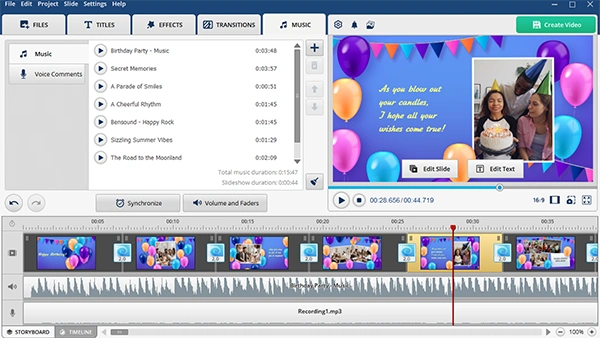
Combining your favorite photos, personal letters and some background music is one of the easiest ways of making a birthday gift feel really unique.
The soundtrack does more than just fill the silence. It sets the tone and is what actually binds the individual photos together into a coherent experience.
An optimistic track can really give travel memories that ‘adventure’ feel, whereas a more gentle instrumental might be the ideal choice for a family honor or a birthday gift for a loved one.
Think about the recipient’s musical preferences when selecting a track. A song they’d have loved as a teenager may be far more likely to initiate a memory than something that’s presently trendy.
If you’re going to be broadcasting the finished video online, then you’ll need to review the music legal requirements.
A photo slideshow with music is really the way to go, as it doesn’t require hours of video or any sort of advanced editing skills. Just pick a few significant images, add a few short messages, select a track to go with it and you’re all done.
Finish it off with a personal birthday message. For more ideas on combining photos and music, have a look at these birthday slideshow ideas and see how to make a birthday slideshow with music.
Once you’ve put the presentation together, just watch it all the way through. This ensures that the soundtrack kicks in and out properly. The captions are readable and each picture is in view long enough for people to look at it.
Common Mistakes to Avoid When Making a Birthday Video
Even a good idea can drop flat if the editing’s in the way. A few standard problems are easy to prevent:
- Excessive length: It can make it rather boring. You want to keep the key memories and get rid of the repeats.
- Poor image quality: Review the photos before you add them. Wherever possible, replace the blurry, low-res images with better ones. Use the poor-quality images at all if they have a particular sentimental value.
- An inappropriate soundtrack: Choose something that suits the individual and the feel you’re going for. An upbeat piece of music might be completely at odds with a moving tribute.
- Too many visual effects: Excessive animation and movement draw awareness away from the photographs. Stick to a few effects that perform well together.
- Inconsistent transitions: Combining dramatic animations with simple fades can make the video look confused. Maintain a constant editing style.
- Overloaded captions: Long passages of text are difficult to follow. Use short notes and let the photographs carry most of the story.
- No clear sequence: Randomly positioned images can make the video feel like a regular photo gallery. Give it a recognizable start, middle, and finish.
Final Tips for Creating a Memorable Birthday Video
Before exporting the finished presentation, watch it on a screen similar to the one the recipient is likely to use.
Review the audio, photograph quality, spelling, and pacing. If feasible, ask someone who understands the birthday person to examine it and convey their impressions.
Keep a high-quality copy of the finished video. You can send it privately, show it during the birthday celebration, or accompany it with a printed photograph or handwritten note.
A memorable birthday video doesn’t depend on sophisticated software or elaborate effects.
What makes it worth keeping is the idea behind the photographs, the music that brings them together, and the story they tell.
Pick beats that will make the recipient smile, laugh, or remember an incident fondly. Those individual elements are what turn a simple video into a personalized video gift they’ll like to watch repeatedly.
Frequently Asked Questions
Ans: Select music that fits someone’s character and complements the visuals. Reduce the sound on audio messages so that people can easily hear what is being said.
Ans: Yes, a photographic slideshow can be highly emotional. Enhance it by adding smooth cuts between images, text and sound, plus voiceovers.
Ans: Between 15 and 25 provocative images are often appropriate for a brief social video. Longer, more reflective birthday videos can incorporate further photographs as long as each one continues the narrative.